








How to Set Up a Proxy on Windows?
Last updated: 2026-10-31 14:24:49
You can set up a proxy on Windows by following these steps:
1. Open Settings → Network & Internet → Proxy.
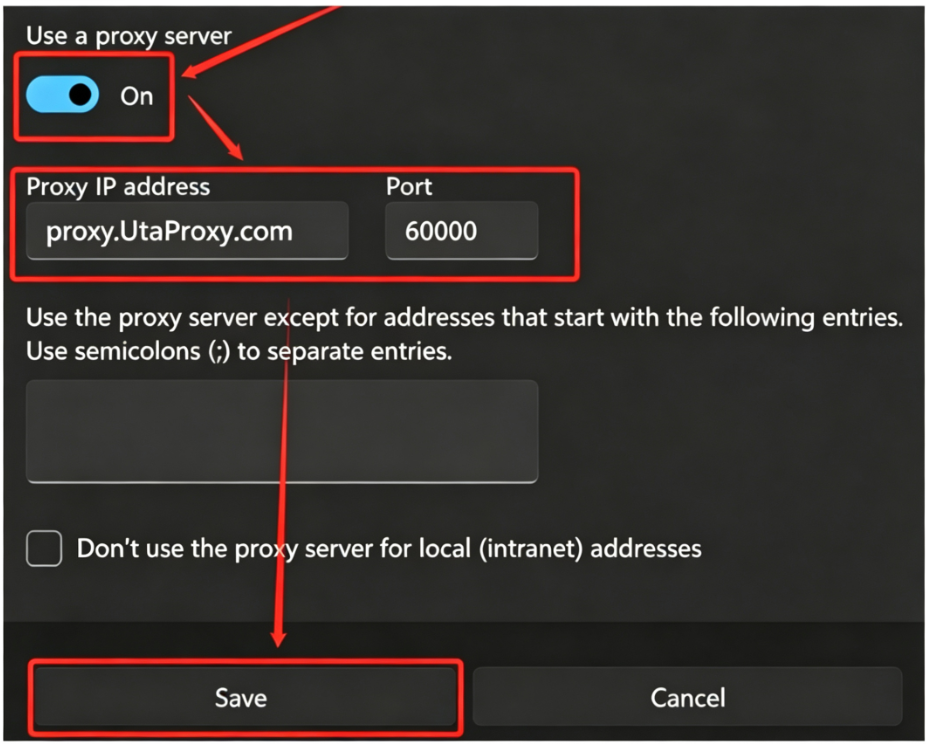
2. Turn on Use a proxy server under Manual proxy setup.
3. Enter your proxy details:
Address: Your proxy host/IP
Port: Your proxy port
Click Save to apply the settings.
4. You’re all set to use the proxy for web access, file downloads, and more. If you choose the Username:Password authentication, simply enter your credentials in the UtaProxy endpoint or generator. Otherwise, be sure to add your IP to the whitelist to secure your connection.
Was this article helpful?
Your response helps us keep this guide clear and accurate.
Rate this article