








How to Set Up a Proxy on Android?
Last updated: 2026-10-31 18:12:42
Follow these steps to configure a proxy on your Android device:
- Get your proxy details (Server, Port, Username, and Password) from your UtaProxy Dashboard.
-
Open Settings on your Android device and go to Wi-Fi.
-
Tap and hold your connected Wi-Fi network, then select Modify network or Manage network settings.
-
Expand Advanced options and find the Proxy settings.
-
Select Manual proxy configuration.
-
Enter your proxy information:
- Proxy hostname
Your proxy server address
- Proxy port
Your proxy port
- Username & Password
Your proxy authentication details (if required)
- For rotating proxies (Residential Proxies, Mobile Proxies, Rotating Datacenter Proxies)
- For static proxies (Static Residential Proxies,Static Datacenter Proxies)
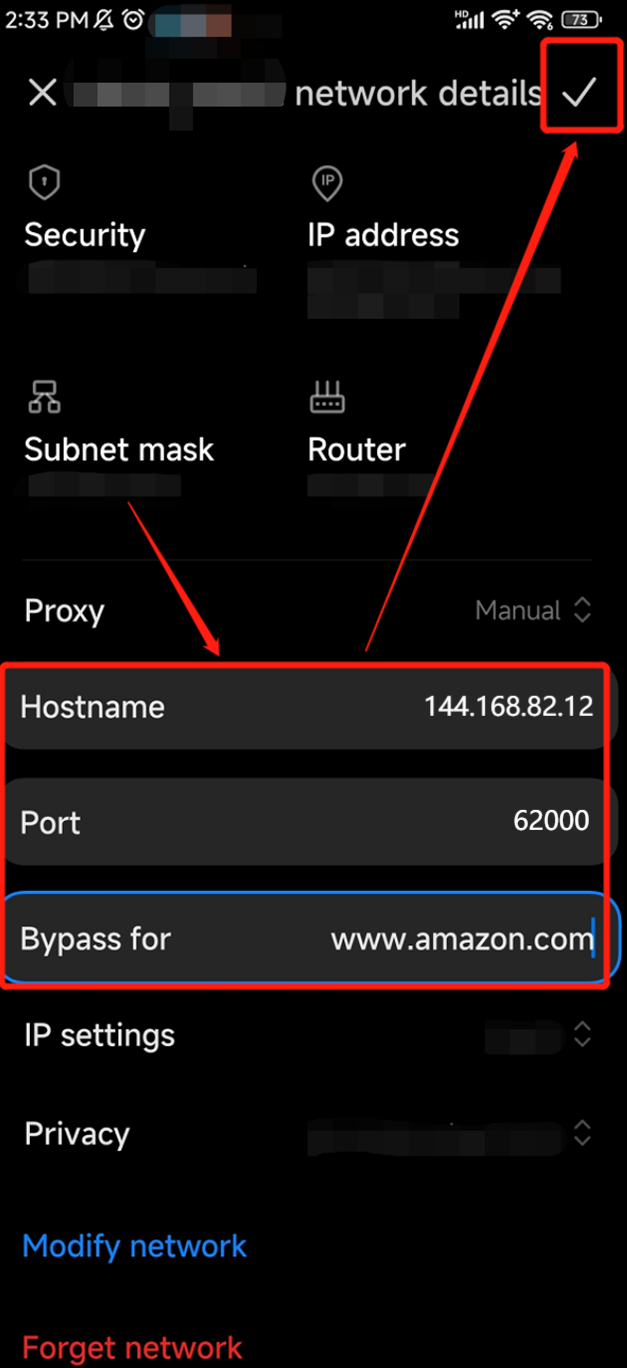
Tap Save to complete the setup. You can then test your connection with an IP detection tool to confirm that the proxy is working properly.
Was this article helpful?
Your response helps us keep this guide clear and accurate.
Rate this article