








How to Use Residential Proxies?
Last updated: 2026-10-31 16:07:08
Step 1: Place an order for Residential Proxies first.
Step 2: Go to Proxies → Rotating Residential Proxies → User-Pass authentication.
Step 3: Configure the parameters in Endpoint Generator to select the proxies you want to use.
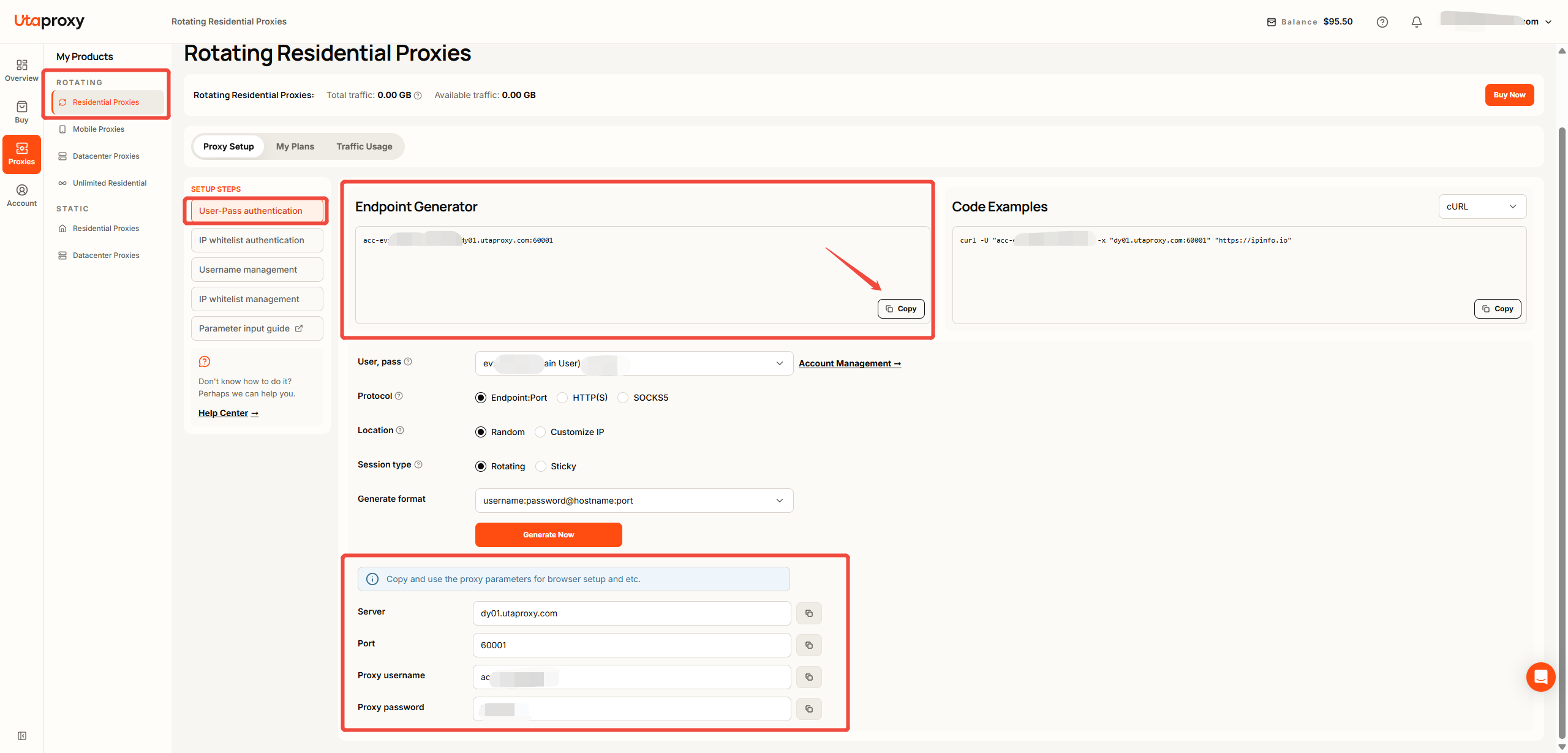
- 1. The code before : is your Username. It may change after you set a Sticky Session or customize the location.
- 2. The code after : and before @ is your Password, which is the password you set for your main user or sub-user.
- 3. dy01.utaproxy.com is the Host/Server, which is equivalent to the UtaProxy gateway.
- 4. 60001 is the Port, which provides access to the selected IP pool.
Step 4: Once the preparation is complete, you can integrate the generated proxy configuration into your device or browser.
Was this article helpful?
Your response helps us keep this guide clear and accurate.
Rate this article