








Rotating Proxies Explained: A Complete Guide for Scraping, SEO & Automation
A rotating proxy is a proxy service that automatically changes your exit IP address, either on every request or at set time intervals. It pulls those IPs from a large pool. Websites no longer see heavy traffic from one address, so you hit fewer rate limits, CAPTCHAs, and IP bans during automated tasks. 🔄
⚡ Quick Takeaways
- Core definition: A rotating proxy swaps your outgoing IP automatically. Your real IP stays hidden from the target site.
- Key mechanism: You send traffic to one gateway (a backconnect node). The gateway picks a fresh IP from its pool for each request or session.
- Main benefits: Better success rates, high concurrency, and fewer CAPTCHAs and blocks. 🚀
- Main types: Rotating residential, unlimited residential, rotating mobile, and rotating datacenter proxies.
- Good to know: Rotation changes your IP only. It does not encrypt your traffic or erase cookies and browser fingerprints. ⚠️
Whether you collect market data or run automated tasks, understanding proxy rotation matters. Let us explore how rotating proxies work behind the scenes.
What Is a Rotating Proxy? 🤔
A rotating proxy sits between your device and the target website. A traditional proxy gives you one fixed IP address. A rotating proxy keeps replacing that IP with a new one from an automated pool.
Why does this matter? Sending hundreds of requests per minute from one IP is a classic bot signal. Anti-bot systems such as Cloudflare or Akamai often rate-limit or block that kind of traffic. A rotating proxy spreads your requests across many IPs, so your traffic looks like many separate visitors from different locations.
How Does a Rotating Proxy Work? (Under the Hood) ⚙️
Knowing the mechanics helps you configure scrapers and automation tools correctly:
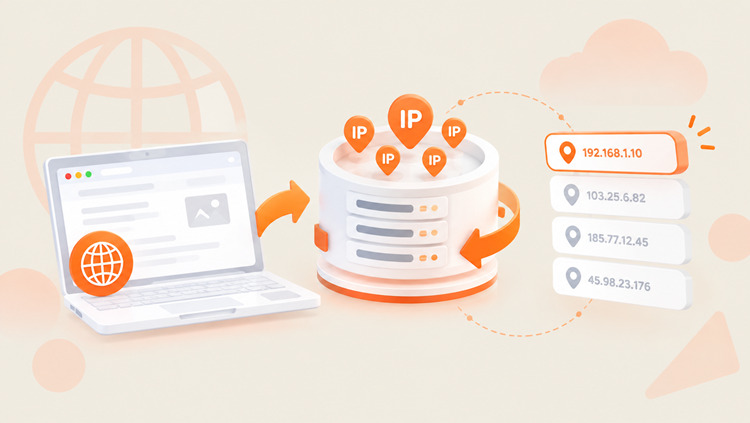
- Client request routing: Your script sends a request to a single gateway endpoint, often called a backconnect node. You do not manage IP lists by hand.
- IP pool selection: The gateway reads your settings, such as target country, session length, or protocol. It then picks an active IP from a pool that can hold millions of addresses.
- Request forwarding and response: The gateway sends your request to the destination site through the chosen IP. The site responds to that IP, and the gateway passes the HTML or JSON back to you.
- Rotation triggers:
- Per-request rotation: Every HTTP/HTTPS request gets a new IP. This suits high-volume scraping of independent pages.
- Time-based or sticky sessions: The same IP stays attached to your session for a set time, such as 1, 5, 10, 30, or 60 minutes. This suits logins, carts, and other multi-step flows. Note that a sticky IP can still drop early if the underlying device goes offline.
Because requests come from many locations and networks, they blend in much better with organic traffic.
Ready to scale your scraping and automation without constant IP bans?
Get started with UtaProxy Rotating Proxies today and tap into a network of 100M+ high-speed IP addresses! ✨
Rotating Proxy vs. Static Proxy: What Is the Difference? ⚖️
The right choice depends on your project. Here is how the two compare:
| Feature | Static / Dedicated Proxy | Rotating Proxy |
|---|---|---|
| IP behavior | One fixed IP that does not change. | Changes automatically per request or time interval. |
| Block resistance | Lower for high-frequency traffic. One flagged IP stops the job. | Higher at scale. Load is spread across a large pool, so one flagged IP matters less. |
| Concurrency | Limited by a single IP and strict per-IP rate limits. | High. Requests are distributed across the pool. |
| Advantages | Stable session identity. Low cost for light tasks. | Automatic rotation, large pools, flexible sessions. |
| Disadvantages | Exposed to sudden bans and rate limits. | Slightly higher latency because of gateway routing. |
| Best for | Long-term account management and social media profiles. | Large-scale scraping, price monitoring, and SERP tracking. |
💡 Quick summary: Use a static proxy when you must keep one IP for days or weeks, such as a social media account that stays logged in. Use a rotating proxy when you send thousands of requests and cannot afford IP bans.
Rotating Proxy vs. VPN: Are They the Same? 🛡️
No. A VPN encrypts your traffic and sends it through one server. It is built for privacy and security. A rotating proxy changes your exit IP across a pool. It is built for scale and automation. Encryption depends on the proxy protocol and setup, and it is not a core feature of rotation.
What a Rotating Proxy Does Not Do ⚠️
Let us set honest expectations:
- It does not make you fully anonymous. Cookies, logins, and browser fingerprints can still identify you.
- It does not guarantee zero CAPTCHAs or bans. Smart anti-bot systems check more than your IP.
- It does not make illegal or unauthorized activity legal.
For the best results, pair rotation with realistic headers, sensible request rates, and the right proxy type. Next, let us look at the main types.
Key Types of Rotating Proxies and Which One You Need 🧭
Different tasks need different levels of trust, speed, and bandwidth. Rotating proxies usually fall into four main types:
1. Rotating Residential Proxies 🏠
Rotating residential proxies use IP addresses that ISPs assign to real homes. Target servers see them as ordinary household users.
- How they work: Requests route through real consumer connections. Anti-bot systems find them much harder to flag than datacenter IPs.
- Best for: E-commerce scraping (such as Amazon or eBay) and targets with strict protection.
Need high success rates and city-level targeting? Check out UtaProxy Rotating Residential Proxies for reliable data extraction.
2. Unlimited Residential Proxies ♾️
Unlimited residential proxies pair residential IPs with flat-rate pricing. Bandwidth is not billed per gigabyte.
- How they work: You use a residential pool without per-GB fees or surprise overages. Always check the provider's fair-use terms and concurrency limits.
- Best for: Data-heavy jobs, media downloads, and long-running automated tasks.
For budget-sensitive projects with heavy data transfer, UtaProxy Unlimited Residential Proxies can cut your monthly bandwidth costs.
3. Rotating Mobile Proxies 📱
Rotating mobile proxies route traffic through 4G/5G carrier networks such as AT&T, Vodafone, or T-Mobile. Mobile IPs generally carry high trust scores.
- How they work: Carriers use CGNAT, so thousands of phones share a small set of IPs. Sites are cautious about blocking these IPs because they could block many real users at once.
- Best for: Mobile app data collection, social media automation, and sites with aggressive anti-bot defenses.
When ban resistance matters most, UtaProxy Rotating Mobile Proxies offer high trust and stable performance.
4. Rotating Datacenter Proxies ⚡
Datacenter proxies come from cloud servers and commercial data centers, such as AWS, DigitalOcean, or Hetzner. They are built for speed.
- How they work: Traffic runs over fast server infrastructure. You get lower latency and higher speeds than residential or mobile networks.
- Best for: Speed-critical scraping, public API monitoring, and sites with basic anti-bot checks.
Want fast responses and strong cost efficiency? UtaProxy Rotating Datacenter Proxies are a solid high-speed choice.
Now that you know the core types, let us weigh the benefits against the limits.
Benefits and Limitations of Rotating Proxies 📊
Key Benefits ✅
- Fewer IP bans: Traffic is spread across many IPs, so no single IP crosses a rate-limit threshold.
- Scalability: Run many parallel requests without managing proxy lists.
- Geo-targeting: Reach local content, prices, and search results in different countries or cities.
- Less maintenance: The gateway handles IP health checks and rotation logic for you.
Limitations to Plan For ⚠️
- Slightly higher latency: Requests pass through a gateway, and residential or mobile routes are slower than datacenter ones.
- Session breaks: Per-request rotation can break logins and carts. Use sticky sessions for those.
- Higher cost: Residential and mobile IPs usually cost more than datacenter IPs.
- Not a silver bullet: Fingerprinting, behavior analysis, and cookies can still trigger blocks.
With the pros and cons clear, let us see how businesses use rotating proxies every day.
Top Business Use Cases for Rotating Proxies 💼
Companies use rotating proxies to scale automated workflows with fewer IP blocks and CAPTCHAs. Here are the most common uses:
Web Scraping and Data Collection 🕷️
Many sites apply strict rate limits to automated traffic. Rotating proxies spread your requests across many IPs. That helps you gather product catalogs, public listings, and market statistics more reliably.
SERP Tracking and SEO Audits 🔍
Search engines customize results by location. SEO teams use rotating proxies to track localized rankings accurately. You can even view Google search results from another country or city as if you were physically there.
E-Commerce and Price Monitoring 🛒
Retailers often block scrapers that watch competitor prices and stock. With rotating residential proxies, teams can monitor dynamic pricing on marketplaces and retail sites across regions with far fewer blocks.
Ad Verification 📢
Advertisers check ad placements in different markets. Rotating proxies help teams confirm that local ads display correctly, test affiliate links, and spot suspicious redirects.
Once you know your use case, picking a provider gets much easier.
What to Look for in a Rotating Proxy Provider (Why Use UtaProxy?) 🏆
Not all proxy networks perform equally. Check these key factors before you commit:
- IP pool size and diversity: A small pool means frequent IP reuse, which raises flags. UtaProxy offers a global pool of 100M+ real IP addresses across 200+ countries and regions.
- Flexible rotation: You need both per-request rotation and sticky sessions. UtaProxy supports sticky sessions from 1 to 60 minutes.
- Speed and uptime: Downtime stops your pipeline. UtaProxy backs its network with a 99.9% uptime guarantee.
- Precise geo-targeting: Look for country, state, and city targeting so you can pick exact locations.
- Protocol support and authentication: Make sure the provider supports HTTP(S) and SOCKS5, plus username/password or IP whitelist access.
- Ethical IP sourcing: Choose a provider that sources residential IPs with user consent and states this clearly.
- Responsive support: 24/7 technical help and clear setup docs prevent costly delays.
Ready to test it yourself?
Explore UtaProxy rotating proxies and pick the plan that fits your workload. Once you choose a provider, integration takes only a few minutes.
How to Use a Rotating Proxy 🛠️
Setting up a rotating proxy needs no network engineering. Follow these four steps:
- Choose a trusted provider: Sign up with a provider like UtaProxy that has high uptime and a large, diverse IP pool.
- Get your endpoint credentials: Open your dashboard and copy your endpoint, username, and password. Always use the exact values shown in your own dashboard. You will also find ready-made snippets for cURL, Python, and Java.
- Configure rotation: Choose per-request rotation for scraping, or a sticky session (such as 5 to 10 minutes) for logins and carts. Set a target country or city if you need one.
- Integrate and test: Add the endpoint to your tool, such as Requests, Scrapy, Puppeteer, Playwright, or Selenium. Then confirm that your IP changes.
Even with correct settings, a few common pitfalls can derail your workflow.
Common Proxy Rotation Errors and How to Fix Them 🚧
Avoid these frequent mistakes in your automated projects:
- Rotating too often during logins: Changing your IP on every request inside a login flow can trigger security checks or account locks. Fix: Use a sticky session (10 to 30 minutes) to keep a consistent identity.
- Ignoring geo-targeting: Jumping between countries in one session can raise alarms on location-sensitive sites. Fix: Lock your rotation to one country or city.
- Using one setup for every target: Datacenter proxies on heavily protected sites often get blocked fast. Fix: Match the proxy type to the target. Use datacenter proxies for simple sites, and residential or mobile proxies for protected ones.
- Sending requests too fast: Even with fresh IPs, extreme request rates look unnatural. Fix: Add delays, retries with backoff, and realistic headers.
- Ignoring site rules: Scraping private or restricted data can create legal risk. Fix: Review the site's Terms of Service and robots.txt, and collect only data you are allowed to use.
How Often Should Your Proxy Rotate? ⏱️
There is no single correct interval. The right frequency depends on your target and workflow:
| Workflow Type | Recommended Rotation | Reasoning |
|---|---|---|
| Large-scale data scraping | Per-request rotation | A new IP for each page request helps you avoid per-IP rate limits. |
| E-commerce cart / checkout | 5 to 10 minute sticky session | Keeps session cookies and cart data valid during the flow. |
| Social media management | 30 to 60 minute sticky session (or a static IP) | Mimics realistic browsing sessions. Check each platform's rules before automating. |
| Public API requests | Per-request or 1 minute sticky | Helps you work within strict API rate limits while ingesting data quickly. |
Below are quick answers to the questions people ask most about proxy rotation.
Frequently Asked Questions (FAQ) ❓
Are rotating proxies legal to use?
Yes. Using rotating proxies is legal in most jurisdictions. Businesses use them for market research, SEO rank tracking, and price comparison. However, you must follow local data privacy laws such as GDPR or CCPA, respect the target site's Terms of Service, and avoid any unauthorized or harmful activity. This is general information, not legal advice.
Do rotating proxies affect speed?
They can. Residential and mobile rotating proxies are often slightly slower than datacenter proxies because traffic runs through real home and carrier networks. You can offset this with higher concurrency and a high-quality gateway.
What is the difference between a sticky session and a rotating proxy?
A per-request rotating proxy gives you a new IP for every HTTP request. A sticky session keeps the same IP for a set time, such as 1, 10, or 30 minutes, and then rotates. Sticky sessions let you keep stateful sessions like logins and carts.
Can websites detect rotating proxies?
Sometimes. Sites can flag datacenter IP ranges, unusual request patterns, or mismatched browser fingerprints. Residential and mobile IPs are harder to flag, but no proxy is undetectable. Good request hygiene matters as much as the proxy itself.
Do rotating proxies hide my identity?
They hide your real IP from the target site. They do not encrypt your traffic by default, and they do not remove cookies, logins, or browser fingerprints. For stronger privacy, combine them with careful browser settings and HTTPS.
Are free rotating proxies safe?
Usually not. Free proxy lists are often slow, unstable, and already blocked. Some can also log or tamper with your traffic. For business use, choose a reputable paid provider.
That covers the essentials, so let us wrap up with a final recommendation.
Final Verdict: Supercharge Your Automation with the Right Proxies 🚀
Now you know what a rotating proxy is and how to pick the right type. Rotation lowers rate-limit headaches, reduces IP blocks, and helps your tools collect data at scale. Remember to match the proxy to the job:
- Choose Rotating Residential or Mobile Proxies for protected sites or workflows that need high trust.
- Choose Unlimited Residential Proxies for heavy, high-volume data transfer on a fixed budget.
- Choose Rotating Datacenter Proxies when speed and cost matter most on open targets.
Daniel Carter
Proxy & Web Data Specialist
Daniel Carter is a Proxy & Web Data Specialist at UtaProxy, focusing on proxy technology, web data collection, and online infrastructure. He writes practical guides and in-depth insights to help businesses understand proxy solutions, choose the right proxy type, and build more reliable data workflows.
You May Also Be Interested
What Is a Proxy Server? How It Works, Types & Uses (2026 Guide)
Confused about proxy servers? See exactly how they work, the 4 main types, and when to use one over a VPN — explained simply, with real use cases.


What Are Residential Proxies? How They Work, Types & Use Cases (2026 Guide)
Learn what residential proxies are, how they route through real home IPs, all proxy types, top use cases, and how to pick a safe provider in 2026.

Datacenter Proxies Explained: Definition, How They Work & When to Use Them
Datacenter proxies are fast, low-cost IPs from cloud servers. Learn how they work, rotating vs static types, pros, cons and when to use them.