What Are Residential Proxies? How They Work, Types & Use Cases (2026 Guide)
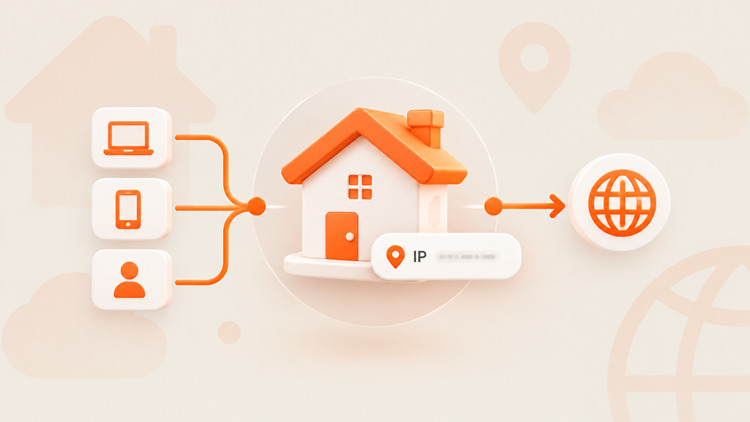
🏠 A residential proxy is an IP address assigned by a real Internet Service Provider (ISP) to a physical home device. Because these IPs belong to ordinary consumer networks, target websites see your traffic as coming from a real human — not a data center or a bot. That makes residential proxies extremely hard to detect or block.
Maybe you need to collect market data without hitting CAPTCHAs. Maybe you're managing dozens of e-commerce or social accounts across regions. Either way, understanding how residential proxies work helps you pick the right network for the job.
🔑 Key Takeaways
- Real network footprint: Residential proxies map to real devices on real ISPs (AT&T, Comcast, Vodafone, etc.), so they carry high trust scores.
- Four flexible formats: Rotating, static (ISP), shared, and dedicated residential proxies — each built for a different job.
- Sourcing matters: Not all "residential" IPs are created equal. Ethically sourced, opt-in networks give you stable, low-risk performance. Shady sourcing gets you banned and creates legal exposure.
- Enterprise availability: Networks like UtaProxy now offer 100M+ residential IPs across 200+ countries, with city-level targeting and SOCKS5 support.
This guide covers what residential proxies are, exactly how a request routes through a home device, the five main proxy types, real-world use cases, and what to check before you buy.
What Is a Residential Proxy? 📡
To really understand what a residential proxy is, it helps to look at where the IP actually comes from — not just the one-line definition.
How Residential IP Addresses Are Sourced
Unlike cloud server IPs racked in a data center, residential IPs come from real home devices. Desktops, smart TVs, phones, laptops — anything connected to a home broadband or mobile network.
Internet Service Providers assign these unique numerical addresses to residential billing locations. When a proxy network accesses these connections through opt-in peer networks or SDK agreements, your web traffic routes through an authentic home setup.
Residential Proxy vs. Datacenter Proxy
The core difference is IP origin. Datacenter proxies are created by cloud hosting providers like AWS, DigitalOcean, or Linode. They're fast and cheap — but they carry a recognizable "hosting" flag that security systems catch easily.
| Feature | Residential Proxy | Datacenter Proxy |
|---|---|---|
| IP source | Real ISPs / home devices | Data centers / cloud hosting |
| Trust signal | Looks like a real user | Flagged as hosting infrastructure |
| Speed | Moderate–high (depends on the home connection) | Usually very high |
| Stability | Depends on device/network uptime | Stable, 24/7 uptime |
| Cost | Usually higher, billed per GB | Usually lower |
| Best for | Geo-targeting, scraping, account management | High-volume, low-security-risk tasks |
Residential Proxy vs. VPN — Not the Same Tool
People mix these up constantly, so let's clear it up. 🔍
- Encryption: A VPN encrypts all traffic on your device through one tunnel. A proxy usually doesn't encrypt anything — it just swaps the IP for whichever app or browser you point at it.
- Scope: A VPN reroutes your whole device through one server (one IP). A residential proxy can assign a different IP per app, per request, or even per browser tab, pulled from a pool of millions.
- Use case: Choose a VPN for personal privacy, public Wi-Fi security, or streaming. Choose a residential proxy when you need IP diversity at scale — scraping, automation, ad verification, multi-account management.
In short: a VPN protects one connection. A residential proxy network gives you thousands of different "identities" to work with.
Pros and Cons
- ✅ Pros: High trust score, low block rate, precise geo-targeting down to city or postal code.
- ⚠️ Cons: Higher cost per GB than datacenter proxies, and speeds are capped by the underlying home connection.
With the trade-offs clear, let's look at exactly how a request travels through a residential proxy network.
How Does a Residential Proxy Work? ⚙️
Without a proxy, your device connects straight to the target website. The server sees your real IP, your ISP, and roughly where you are — instantly.
With a residential proxy in the loop, your connection follows five steps:
- You send a request. Your browser or automation tool sends an HTTP, HTTPS, or SOCKS5 request.
- The proxy receives it. The proxy network's gateway picks up your request.
- A residential IP handles the routing. The gateway forwards it through an active consumer device on a real home network.
- The target site responds. The server treats the connection as a normal visitor and sends back the page data.
- The response returns to you. The home device and gateway relay the data back to your screen.
That five-step handoff is what makes residential proxies so effective — and it's built on a few key mechanics underneath.
Why Target Sites Don't Block Residential IPs
Sites like Amazon, Instagram, or Google run automated risk-scoring on every visitor. A request from a Comcast or AT&T IP reads as "person browsing from home," so it usually clears anti-bot checks without friction.
Device Routing
Your request travels through consumer-grade hardware — a phone, a laptop, a router. Device owners opt in to share idle bandwidth, usually in exchange for rewards or free app access.
IP Address Rotation
Home devices connect and disconnect all day, so only a portion of the pool is active at any moment. Good proxy gateways handle this automatically, rotating IPs per request or holding a "sticky" session (typically 5–60 minutes) to mimic natural browsing.
Depending on what you're building, different rotation and sourcing setups make sense. Here's how the market breaks it down.
4 Types of Residential Proxies 🧩
"Residential proxy" is often used as a catch-all for rotating IP pools, but the market actually splits into four distinct formats.
1. Rotating Residential Proxies
Rotating residential proxies swap your exit IP automatically — every request, or on a timer (5, 10, 30, 60 minutes).
- Best for: Large-scale scraping, price monitoring, SEO rank tracking.
2. Static Residential Proxies (ISP Proxies)
Static residential proxies — often called ISP proxies — combine the speed and near-100% uptime of a data center with the trust score of a residential ASN. The same IP stays assigned to you for days or months.
- Best for: Social account management (Instagram, TikTok, Facebook), e-commerce storefronts, persistent logins.
3. Shared Residential Proxies
Multiple users draw from the same IP pool at the same time. Cheaper, but you're sharing bandwidth demand with other customers — fine for light, low-risk tasks.
4. Dedicated Residential Proxies
One IP, reserved exclusively for your account. No noisy neighbors, no shared risk footprint — full control over the session.
Picking the right format is only half the equation. Here's where these proxies actually earn their keep.
What Are Residential Proxies Used For? 🚀
Businesses and technical professionals rely on residential proxies to bypass geographical filters, protect digital assets, and collect market intelligence reliably.
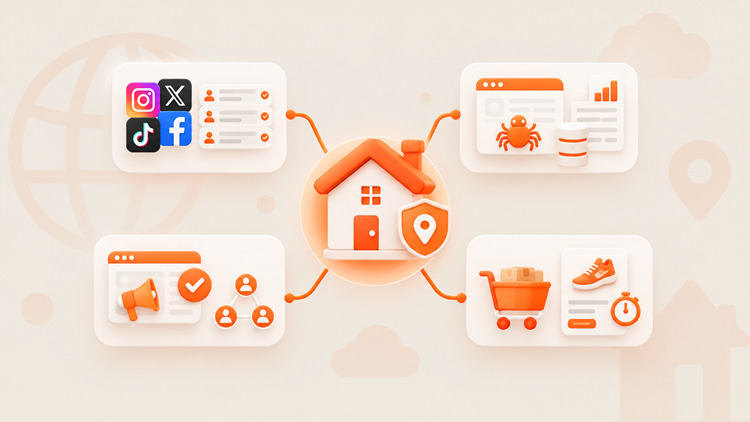
1. Social Media & Multi-Account Management
Platforms cap how many accounts can run from one IP. Agencies pair static residential proxies with anti-detect browsers to give each client profile its own localized home IP — avoiding cross-account link flags and errors like Instagram's "Feedback Required."
2. Web Scraping & Data Intelligence
E-commerce sites and search engines run serious anti-scraping defenses (Cloudflare, Akamai, etc.). Rotating residential proxies spread requests across millions of household IPs, so the traffic pattern looks organic rather than automated.
3. Ad Verification & Affiliate Marketing
Ad networks geo-target their creative, but publishers occasionally hijack traffic or serve fraudulent links. Advertisers use residential IPs in the target city to confirm ads are showing correctly and catch localized fraud.
4. E-Commerce & Limited Drops
Sneakers, tickets, and limited collectibles sell out in seconds. Residential proxies let buyers submit checkout requests from multiple distinct household IPs at once, improving the odds of a successful purchase.
Once you know your use case, the next step is picking a provider that actually delivers on the trust-score promise.
How to Choose a Residential Proxy Provider ✅
When selecting a residential proxy provider, evaluate key technical specifications rather than relying on promotional marketing claims alone:
IP Pool Size
Look for tens of millions of active IPs. A bigger pool means less IP reuse, fewer subnet-level blocks, and fresher locations.
Location Targeting
Top providers let you filter by country, region, state, city — and sometimes even mobile carrier.
Rotation Options
You want both per-request rotation and sticky sessions, so you can handle fast scraping and long form-fills with the same network.
Protocol Support (HTTP/HTTPS/SOCKS5)
SOCKS5 matters for non-browser traffic — custom scripts, UDP connections, and anti-detect browser integrations.
Ethical Sourcing 🤝
This one gets skipped a lot, but it shouldn't. Ask how a provider sources its IPs. Networks built on clear, opt-in agreements with real device owners give you a cleaner, more stable pool — and keep you clear of the legal gray zone that comes with undisclosed bandwidth resale.
Pricing
Rotating residential proxies are usually billed per GB. Static ISP proxies are usually billed per dedicated IP, monthly.
Start Your Free Trial
- 100M+ Real Residential IP Pool: Covers 200+ countries and territories with precise city-level and carrier-level targeting.
- Dual Protocol Support: Full compatibility with HTTP(S) and SOCKS5 protocols for quick integration with automation scripts, tools, and browsers.
With the shopping checklist covered, here are quick answers to the questions people ask most.
Frequently Asked Questions ❓
Are residential proxies legal?
Yes, in most countries. They're used for legitimate purposes — market research, brand protection, ad verification, cybersecurity testing. Using them for fraud, attacks, or to violate a platform's terms of service is not legal, regardless of the proxy type.
Are residential proxies better than datacenter proxies?
For bypassing strong anti-bot systems, geo-restricted content, or managing social accounts — yes, residential wins. For straightforward, high-speed tasks on low-security sites, datacenter proxies are cheaper and faster.
Residential proxy or VPN — which do I need?
If you want simple, private, encrypted browsing for yourself, use a VPN. If you need many different IPs, per-app or per-request rotation, and city-level targeting at scale, use a residential proxy.
Can residential proxies target specific countries or cities?
Yes. Reputable providers let you filter by country, state, city, or even carrier, directly from a dashboard or API parameter.
Are residential proxies completely undetectable?
No proxy is fully invisible. Residential IPs carry the highest trust score available, but sites also watch behavior — request rate, patterns, timing. Hammering a site with hundreds of requests per second from one IP will still get flagged.
Should I use free residential proxies?
Not recommended. Running a real residential network is expensive, so free services often make money by logging your traffic, harvesting data, or turning your device into an unauthorized exit node without your knowledge. Stick to verified, transparently sourced providers.
Final Verdict
Residential proxies are core infrastructure now — for data collection, brand protection, and social/e-commerce account management alike. Routing through real consumer ISP networks lets you bypass geo-restrictions and anti-bot systems without raising flags.
Ready to try it yourself? UtaProxy gives you access to 100M+ residential IPs across 200+ countries, flexible rotation, and full SOCKS5 support. Claim your free trial today and see unblocked, city-level web access in action. 🌍

Daniel Carter
Proxy & Web Data Specialist
Daniel Carter is a Proxy & Web Data Specialist at UtaProxy, focusing on proxy technology, web data collection, and online infrastructure. He writes practical guides and in-depth insights to help businesses understand proxy solutions, choose the right proxy type, and build more reliable data workflows.