








What Is a Proxy Server? How It Works, Types & Uses (2026 Guide)
A proxy server sits between your device and the internet. When you send a web request, it goes to the proxy first. The proxy fetches the page, processes the data, and sends it back to you. This hides your real IP address, boosts privacy, and unlocks geo-restricted content.
People and businesses use proxies for many reasons. Everyday users use them to hide locations and bypass web filters. Businesses use them to secure networks, monitor search results, and scrape web data safely. Understanding proxies is key to navigating modern web tools.
Key Takeaways⚡
- 🌉 Intermediate gateway: A proxy server sits between your device and the target website, masking your real IP address.
- 🗂️ Four ways to classify proxies: by IP origin (residential, datacenter, mobile), by direction (forward vs. reverse), by anonymity level (transparent, anonymous, elite), and by protocol (HTTP, HTTPS, SOCKS5).
- 🔐 Proxy ≠ VPN: Proxies typically work at the application level and don't encrypt all your traffic by default. VPNs encrypt everything, system-wide.
- 💼 Business favorite: Proxies power web scraping, ad verification, social media management, market research, and network security.
- ⚠️ Quality matters: Free proxies come with real security risks — logging, malware, slow speeds. Paid residential or datacenter proxies are far more reliable.
To help you navigate proxy technologies effectively, this comprehensive guide explains how proxy servers function, breaks down their core types, and reviews their practical applications.
What Is a Proxy Server?
In simple terms, a proxy server is a gateway between you and the internet. It is an intermediary server separating end users from the websites they browse. Proxy servers provide varying levels of functionality, security, and privacy depending on your use case, needs, or company policy.
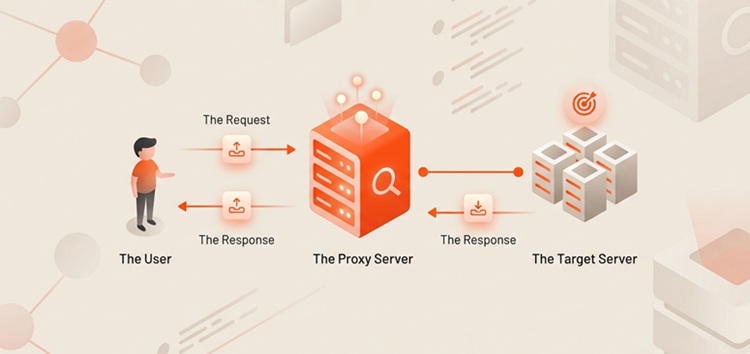
If you are using a proxy server, internet traffic flows through the proxy server on its way to the address you requested. The request then comes back through that same proxy server (there are exceptions to this rule), and then the proxy server forwards the data received from the website to you.
Understanding the connection flow clarifies how a proxy server alters standard web browsing:
- Standard Connection: Client Device → Internet Service Provider (ISP) → Target Website
- Proxy Connection: Client Device → Proxy Server → Target Website → Proxy Server → Client Device
In a standard connection, the target website sees your exact IP address, device location, and ISP details. When you route traffic through a proxy server, the target website only sees the proxy server's IP address and location metadata. Your personal details remain hidden behind the intermediate node.
Is a Proxy the Same as a VPN or a Firewall?
People often confuse proxy servers with Virtual Private Networks (VPNs) and firewalls because all three manage network traffic and privacy. However, they operate at different layers of the network stack and serve distinct security purposes.
- Proxy Server vs. VPN: A proxy server works primarily at the application layer (such as your web browser or a web scraper script). It re-routes traffic for specific applications without necessarily encrypting the data. A VPN works at the system/operating system level, creating an encrypted tunnel for all network traffic leaving your device.
- Proxy Server vs. Firewall: A firewall is a network security system that monitors and filters incoming and outgoing network traffic based on predetermined security rules. It blocks unauthorized access to or from a private network. A proxy server handles web requests on behalf of a client, masking identities or caching web pages, though it can also contain basic firewall filtering rules.
To compare these three critical network technologies clearly, review the summary table below:
| Feature | Proxy Server | VPN (Virtual Private Network) | Firewall |
|---|---|---|---|
| Operating Level | Application Level (e.g., HTTP, SOCKS5) | System / Network Level (OS-wide) | Network Traffic Boundary / Port Level |
| Traffic Encryption | Optional (HTTPS/SOCKS5 supported) | Default full-tunnel encryption | Does not encrypt traffic |
| IP Masking | Yes (replaces client IP) | Yes (replaces client IP) | No (focuses on traffic filtering) |
| Primary Function | Traffic rerouting, caching, web scraping, geolocation spoofing | End-to-end user privacy and secure remote connections | Blocking malicious traffic and unauthorized port access |
| Configuration Scope | Configured inside specific apps or scripts | Activated across the whole device/router | Installed at the network perimeter or OS level |
💡 Quick tip: Use a proxy when you need lightweight, high-speed IP rotation for specific tasks like web scraping or managing multiple social media profiles. Choose a VPN when you need complete, encrypted online privacy across your entire computer or mobile phone.
Now that you know what a proxy server is and how it compares to other networking tools, let's look at how a proxy handles a web request behind the scenes.
How Does a Proxy Server Work?
Every computer on the internet needs a unique Internet Protocol (IP) address. Think of this IP address as your street address. Just as the post office needs your street address to deliver a letter, the internet needs your IP address to return web data to your device.
When you send a request to a website without a proxy, that request goes straight from your device to the target server. The server reads your IP address, processes your location, and returns the requested webpage directly. When you route traffic through a proxy server, a precise step-by-step process takes place.
1. You Send a Request📤
The process begins when you type a URL into your browser, run an automated web scraper script, or launch an application configured to use a proxy. Your device generates an HTTP, HTTPS, or SOCKS5 request containing header information, destination web details, and payload data. Instead of sending this packet straight to the target server's IP, your device directs the packet to the IP address and port of your configured proxy server.
2. The Request Goes Through a Proxy🔍
The proxy server interceptively receives your request packet. Upon arrival, the proxy processes your request according to its rules and settings. Depending on its configuration, the proxy can perform several actions:
- It strips away your original IP address from the packet header.
- It replaces your IP address with its own IP address or a fresh IP from its proxy pool.
- It checks its local cache memory to see if it already holds a copy of the requested webpage.
- It inspects request headers to evaluate security, block unwanted content, or add custom user-agent parameters.
3. The Proxy Connects to the Target Server🎯
Once your request is properly modified, the proxy server sends it across the internet to the destination web server. From the perspective of the target website's web server, the request originates entirely from the proxy server. The target server logs the proxy's IP address, evaluates the geolocation of the proxy, and checks for any anti-bot security challenges without knowing your real location.
4. The Response Goes Back Through the Proxy📥
The target server processes the request and sends the webpage data, images, or JSON payload back to the proxy server. The proxy receives this inbound data, evaluates it for malware or malicious scripts, saves a copy to its local cache if caching is turned on, and forwards the final response back to your client device. You view the webpage seamlessly, oblivious to the intermediate processing steps.
This flow allows proxy servers to perform several critical security and administrative functions. Next, we will cover what a proxy server does in real-world deployments.
What Does a Proxy Server Do?
While hiding your IP address is the most well-known feature of a proxy, modern proxy servers handle a wide range of operational tasks for both personal and enterprise users.
🕵️Hide or Change Your IP Address
The fundamental feature of a proxy server is IP masking. By hiding your actual IP address, proxy servers prevent target websites, advertisers, and malicious actors from tracking your online identity back to your physical home or office location. This anonymity helps prevent localized tracking, targeted price discrimination, and profile building by data brokers.
🚦Route Internet Traffic
Proxy servers act as traffic directors. For large enterprises, managing thousands of incoming and outgoing web requests can bottleneck internal networks. A proxy server efficiently routes internal outbound requests, distributes bandwidth consumption, and prevents single-point network congestion.
🌍Access Location-Specific Content
Websites alter content, pricing, and availability based on the visitor's geographical location. If a company wants to audit how its website appears to users in Tokyo, London, or New York, it can route requests through localized proxy servers situated in those specific cities. This capability allows accurate cross-border market research, local SERP checking, and streaming access.
🚫Filter and Control Traffic
Organizations and educational institutions deploy forward proxy servers to manage and regulate internet usage across internal networks. System administrators can configure proxies to block access to unwanted websites, social media platforms, adult content, or known malicious domains. When a user on the network attempts to visit a restricted URL, the proxy denies the request before it leaves the corporate perimeter.
🔒Improve Privacy and Anonymity
Using a high-anonymity proxy server helps protect your personal data from invasive tracking networks and public Wi-Fi eavesdroppers. While a proxy server alone does not deliver 100% total anonymity (because your hardware fingerprint and web cookies still transmit identifiers), it removes the primary tracking mechanism used across the web: your static IP address.
🛡️Block Unsafe or Inappropriate Websites
In addition to restricting specific domains, proxy servers act as security buffers. Advanced proxies scan incoming files, scripts, and downloads for known malware payloads, phishing links, and viruses before delivering them to the end user's device. This preemptive filtering protects network endpoints from zero-day threats.
⚡Cache Data for Faster Speeds
Proxy servers can cache (save a local copy of) frequently visited web pages. If 50 employees in an office access the same news website or company portal throughout the day, the proxy server downloads the website files once. When subsequent users request the page, the proxy server delivers the cached copy locally rather than making repeated internet requests to the external target server. This process dramatically reduces network bandwidth usage and improves page load speeds.
Note: Caching is highly effective for static resources like images, CSS stylesheets, and public documents. However, dynamic websites that require user logins (like banking portals or social media dashboards) bypass local caches to ensure real-time data accuracy.
Because proxy servers fulfill so many roles, they come in several distinct setups. Let's look at how proxy servers are classified across different network structures.
Types of Proxy Servers
Proxy servers cannot be categorized using a single definition. To choose the right setup, you must understand how proxies are classified across four key dimensions: IP origin, traffic direction, anonymity level, and network protocol.
The diagram below illustrates how these four classification dimensions break down into specific proxy varieties:
- IP Origin & Location: Residential, Datacenter, Mobile
- Traffic Flow & Function: Forward Proxy, Reverse Proxy
- Anonymity Level: Transparent, Anonymous, Elite / High Anonymity, Distorting
- Protocol: HTTP, HTTPS, SOCKS5
Categorization by Network Architecture and Location
🏠Residential Proxies
A residential proxy provides an IP address attached directly to a physical home location, issued by a legitimate Internet Service Provider (ISP) such as Comcast, AT&T, or Vodafone. Because these IPs belong to genuine residential devices (like home Wi-Fi routers), target web servers view them as authentic human visitors.
- Key Advantage: Extremely high trust score; rarely flagged or blocked by anti-bot systems.
- Best Used For: Web scraping, ad verification, social media management, purchasing limited-edition retail items.
🖥️ Datacenter Proxies
Datacenter proxies are synthetic IP addresses created inside cloud data centers (like AWS, DigitalOcean, or Linode). They are not affiliated with an ISP or a physical home address. Datacenter proxies exist purely to route internet traffic through high-speed cloud infrastructure.
- Key Advantage: Blazing-fast response speeds, exceptional uptime, and cheap bulk pricing.
- Best Used For: Bulk data extraction from non-protected sites, automated performance testing, high-speed monitoring.
📱Mobile Proxies
Mobile proxies route web requests through mobile data networks (3G, 4G LTE, or 5G) assigned by cellular carriers (such as Verizon, T-Mobile, or EE). Because thousands of cellular devices share small pools of carrier IPs via CGNAT (Carrier-Grade NAT), web target servers almost never block mobile IPs without risking blocking legitimate mobile users.
- Key Advantage: Highest level of stealth and resistance to IP bans.
- Best Used For: Mobile app testing, highly sensitive web automation, Instagram/TikTok account management.
Categorization by Traffic Flow and Direction
➡️Forward Proxy
A forward proxy (commonly referred to simply as a "proxy") sits in front of client devices. Its primary role is to retrieve data from external web servers on behalf of local clients. When an employee browses the web from a corporate laptop, a forward proxy intercepts the outbound request, evaluates access rules, hides the employee's internal IP address, and fetches the page. The client controls and configures a forward proxy.
⬅️Reverse Proxy
A reverse proxy sits in front of target web servers and intercepts incoming request traffic from external clients. Instead of protecting the client, a reverse proxy protects and optimizes the origin web server. Popular services like Cloudflare and NGINX operate as reverse proxies. They manage load balancing across multiple servers, cache dynamic content, handle SSL/TLS decryption, and block Distributed Denial of Service (DDoS) attacks before traffic reaches the main web infrastructure.
Categorization by Anonymity Level
Not all proxies hide your personal data with the same level of security. They are categorized into three main anonymity tiers:
Transparent Proxies
Transparent proxies do not hide your IP address. They identify themselves as a proxy server in the request header and pass your real IP address through the X-Forwarded-For HTTP field. They are called "transparent" because your browser connects through them automatically without special configuration. Schools and libraries frequently use transparent proxies for web filtering and content caching.
Anonymous Proxies
An anonymous proxy (also called a simple anonymity proxy) identifies itself to target websites as a proxy server in its request header, but it masks your real IP address by substituting a dummy IP or its own address. The target server knows you are using a proxy, but it cannot see your true location or home device details.
Elite / High Anonymity Proxies
Elite proxies (also known as High Anonymity proxies) offer the maximum privacy level. They strip away all proxy signatures from the HTTP header (such as HTTP_VIA or X-Forwarded-For). The target server cannot tell that a proxy is being used at all; it sees the request as a direct, authentic visit coming from a regular home browser.
Distorting Proxies
A middle ground: it tells the site it's a proxy, but swaps in a fake IP address instead of your real one. Handy for making it look like you're browsing from a specific country while still hiding your own location.
Categorization by Transfer Protocol
HTTP Proxies
HTTP proxies interpret hyper-text transfer protocol traffic. They are designed exclusively for web pages and plain web requests. While they are fast for simple scraping tasks, they cannot route encrypted traffic cleanly or handle non-web protocols like email or FTP.
HTTPS Proxies (SSL Proxies)
HTTPS proxies support the Secure Sockets Layer / Transport Layer Security (TLS) protocol. They establish an encrypted connection between the client, the proxy, and the destination server. This prevents third parties on your local network from snooping on the data payload transferred during the proxy session.
SOCKS5 Proxies
SOCKS5 is a versatile, low-level protocol that operates below the application layer. Unlike HTTP proxies, SOCKS5 proxies can route any type of traffic, including HTTP, HTTPS, FTP, SMTP, and UDP packets. SOCKS5 proxies do not rewrite HTTP headers, making them lightweight, fast, and ideal for data-intensive applications like P2P torrenting, live streaming, video gaming, and heavy web scraping tools.
Summary Checklist:
- Need Maximum Stealth? Choose Residential/Mobile + Elite + SOCKS5
- Need Raw Speed & Low Cost? Choose Datacenter + HTTP/HTTPS
- Need Server Protection? Deploy a Reverse Proxy
With these foundational concepts established, we can now look at how businesses and individuals apply proxy technology in practice.
How to Set Up a Proxy Server 🛠️
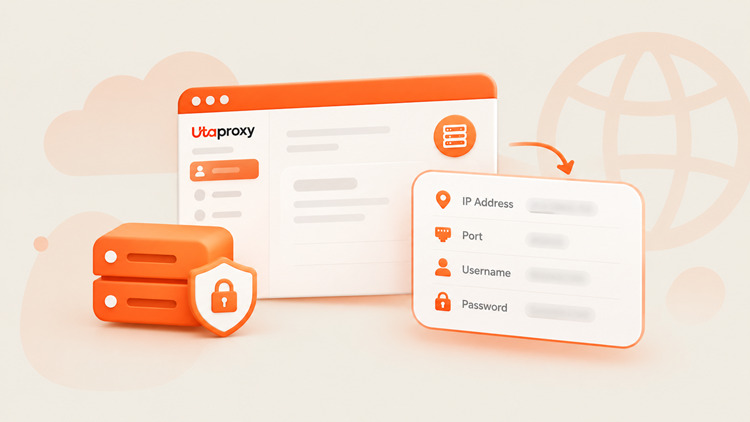
Actually connecting to a proxy is usually simpler than picking one. Here's the general flow on most devices and browsers:
- Get your proxy details. Your provider gives you an IP address, a port number, and (usually) a username/password.
- Open your network settings. On Windows: Settings → Network & Internet → Proxy. On macOS: System Settings → Network → Proxies. Most browsers also have their own proxy settings under network or connection preferences.
- Enter the proxy address and port. Choose the right protocol (HTTP, HTTPS, or SOCKS5) to match what your provider gave you.
- Authenticate if needed. Enter the username and password your provider assigned.
- Test the connection. Visit an IP-checker site. If it shows the proxy's IP instead of yours, you're good to go. ✅
For scraping or automation at scale, developers usually skip manual setup entirely and configure the proxy directly inside their script or scraping tool (via request headers or a proxy pool API).
What Are Proxy Servers Used For?
While proxy servers serve individual privacy needs, their primary commercial adoption is driven by data-driven business operations. Here are five top real-world applications of proxy servers today.
🎬Accessing Geo-Restricted Content
Media platforms, news networks, and streaming services often limit content distribution to specific countries due to licensing agreements. Individuals use localized proxies to route their requests through valid geographical regions, allowing them to view news portals and digital media as if they were physically standing inside those borders.
💰Market Research and Price Intelligence
E-commerce retailers change product prices dynamically based on a buyer's IP location, browsing history, and regional demand. To gather clean market intelligence, companies use proxy networks to monitor competitor pricing, analyze international promotional campaigns, and review localized catalog layouts without triggering anti-scraping flags or seeing localized price markups.
📱Social Media Management
Marketing agencies often manage dozens of social media accounts for international clients on platforms like Instagram, LinkedIn, TikTok, and X (formerly Twitter). Logging into multiple accounts from a single IP address triggers security flags, resulting in account suspensions. Agencies assign dedicated residential or mobile proxies to each client profile inside anti-detect browsers, preserving clean session isolation and preventing cross-account linkage.
🏢Business and Corporate Networks
Modern enterprises deploy proxy infrastructure to protect corporate assets. Proxies serve as a central monitoring station where security teams inspect outbound traffic for malware, prevent employees from visiting dangerous phishing sites, and enforce access control policies across remote workforce devices.
🤖Web Scraping & Automation
Web scraping is the automated extraction of web data at scale. Whether gathering real-time stock prices, real estate listings, or AI training datasets, scraping scripts send thousands of requests per minute to target websites. If those requests come from a single IP address, the target site immediately blocks the IP. Developers use rotating proxy pools to automatically swap IP addresses on every request, allowing web scrapers to gather massive datasets smoothly without hitting access limits.
While proxies unlock powerful benefits for automation and privacy, they also present potential limitations that you should consider.
Advantages and Disadvantages of Using a Proxy Server
Using a proxy server provides significant operational advantages, but it also carries potential pitfalls depending on proxy quality and configuration settings.
✅Advantages
- IP Masking & Privacy: Conceals your true IP address and hardware location from remote web trackers.
- Location Flexibility: Allows you to simulate web sessions from virtually any city or country worldwide.
- Traffic Routing & Control: Enables network administrators to manage outbound web access and filter undesirable content.
- Automation Support: Facilitates high-scale API interactions, programmatic testing, and multi-account automation without triggering rate limits.
- Web Scraping Capabilities: Bypasses basic anti-bot blocks, CAPTCHA challenges, and IP rate limits during data extraction.
- Bandwidth Savings: Web page caching reduces repeated server requests and speeds up local load times across large corporate networks.
⚠️Potential Limitations
- Speed Variability: Routing traffic through an intermediate node adds physical latency. Poorly optimized proxies can slow down your browsing speed.
- Target Website Blocks: Low-quality datacenter proxy IPs are easily recognized by security platforms like Cloudflare or Akamai and can be blocked outright.
- Free Proxy Security Risks: Public, free proxy servers are highly unsafe. Free proxy operators can log your unencrypted browsing sessions, steal sensitive credentials, or inject unauthorized ads into web pages.
- Lack of Full System Encryption: Unlike VPNs, standard proxies do not automatically encrypt all background device traffic unless explicitly configured with HTTPS/SOCKS5 parameters.
- Complex Setup Requirements: Setting up rotating proxy pools for web scraping requires programming knowledge, custom header management, and error-handling code.
Security Alert: Avoid using "free" public proxies for personal tasks or business operations. Operating proxy infrastructure costs money. Free proxy providers often monetize their systems by logging user passwords, stealing credit card details, or selling your personal bandwidth to commercial networks.
To avoid these drawbacks, you must select the right proxy type for your specific project needs. Here is a clear selection framework.
How to Choose the Right Proxy Server
Selecting the best proxy solution depends on your budget, speed requirements, target site security, and scale. Use the operational matrix below to match your specific use case with the right proxy architecture.
| Use Case | Scenario & Requirements | Recommended Proxy | Why It Works |
|---|---|---|---|
| Web Scraping | Extracting web data from sites with anti-bot protection (e.g., e-commerce, real estate). | Rotating Residential Proxies | IPs change per request to mimic human behavior and bypass rate limits. (Use Datacenter if on a tight budget with basic targets). |
| High-Speed Tasks | Projects requiring fast response times, high concurrency, and low latency without strict anti-bot checks. | Datacenter Proxies | Hosted on high-speed fiber-optic cloud infrastructure, offering maximum speed and performance. |
| Location-Specific Access | Verifying local ads, checking regional SERPs, or accessing city-level localized databases. | Residential or Mobile Proxies (with Geo-Targeting) | Access to global peer-to-peer IP pools tagged with specific country, state, or city locations. |
| Stable IP Sessions | Maintaining persistent user logins (e.g., managing e-commerce stores, streaming, or online banking). | Static Residential (ISP) Proxies | Combines the high trust score of a residential IP with the dedicated uptime and speed of a datacenter node. |
| Large-Scale Automation | Running automated browser scripts (Selenium, Puppeteer) on strict networks or ticketing sites. | Mobile Proxies / Rotating Residential Pools | Cellular IP ranges are shared by thousands of users via CGNAT, making them virtually impossible for websites to block. |
Frequently Asked Questions About Proxy Servers
What is a proxy server in simple terms?
It's a middle computer between you and the websites you visit. Your request goes to the proxy first, the proxy fetches the page, and sends it back to you — keeping your real IP hidden the whole time.
What is the purpose of a proxy server?
To control, optimize, and mask internet traffic. People use it for privacy and to get around geo-restrictions. Businesses use it to secure networks, run global content audits, manage brand accounts, and scrape data at scale.
Does a proxy hide your IP address?
Anonymous and elite proxies do, completely. Transparent proxies don't — they pass your real IP through in the request headers, since their job is caching and basic filtering, not hiding you.
Is a proxy the same as a VPN?
No. Both reroute traffic and hide your IP, but a proxy usually works at the app level and skips encryption unless you specifically configure HTTPS or SOCKS5. A VPN encrypts everything leaving your device, system-wide.
Are proxy servers legal?
Yes, completely — proxies are standard tools used daily for security, caching, and analytics. What's illegal is using one to break the law: hacking, fraud, or copyright violations don't become legal just because a proxy is involved.
Are free proxy servers safe?
Generally, no. Running a proxy costs real money, so free ones often cover that cost by logging your browsing, harvesting credentials, or injecting ads. Stick to a reputable paid provider for anything sensitive.
Can a proxy see everything I do online?
Yes — unless your traffic is encrypted (HTTPS or SOCKS5), the proxy operator can technically see the data passing through it. That's exactly why provider trust matters more than price.
Conclusion
Proxy servers are essential tools in modern network security, data collection, and digital management. By acting as an intermediate gateway between client devices and target web servers, proxies allow you to hide your real IP address, bypass regional content restrictions, optimize bandwidth usage, and manage corporate security policy controls.
Whether you need high-speed datacenter proxies for basic automated checks, rotating residential proxies for web scraping, or secure SOCKS5 proxies for application traffic, matching your technical needs with the correct proxy architecture is key to achieving optimal speed, privacy, and success.

Daniel Carter
Proxy & Web Data Specialist
Daniel Carter is a Proxy & Web Data Specialist at UtaProxy, focusing on proxy technology, web data collection, and online infrastructure. He writes practical guides and in-depth insights to help businesses understand proxy solutions, choose the right proxy type, and build more reliable data workflows.