








Datacenter Proxies Explained: Definition, How They Work & When to Use Them
A datacenter proxy is an intermediary server that uses an IP address from a data center or cloud host. It does not use an IP from a home Internet Service Provider (ISP). 🌐 It hides your real IP address from the websites you visit. It is fast, affordable, and easy to scale. That is why datacenter proxies are so popular for web scraping, price monitoring, and SEO tracking.
⚡ Key Takeaways
- 🏢 Definition: Datacenter proxies use IP addresses hosted in commercial data centers (such as AWS, DigitalOcean, or Hetzner). They do not use home or mobile networks.
- 🚀 Top advantage: They are fast, low-latency, and usually much cheaper than residential proxies.
- 🔄 Two core modes: Rotating proxies swap IPs for large-scale scraping. Static proxies keep a fixed IP for stable sessions.
- ⚠️ Main trade-off: Datacenter IP ranges are publicly identifiable. Strict anti-bot systems (like Cloudflare or Akamai) can detect and block them more easily than residential IPs.
- 🧭 Rule of thumb: Use datacenter proxies for open, high-volume targets. Switch to residential or ISP proxies for heavily protected sites.
Knowing what datacenter proxies are helps you decide if they fit your project. Let's start with the basics. 👇
🏢 What Are Datacenter Proxies?
Datacenter proxies are proxy servers hosted in commercial server facilities. They sit between your device and the target website. Unlike residential proxies, they are not linked to a home Wi-Fi connection. They run on servers built to move large amounts of data.
Their IP addresses come from cloud and hosting companies. They do not come from consumer ISPs like Comcast or AT&T. Every IP address belongs to an Autonomous System (AS), identified by an Autonomous System Number (ASN). For a datacenter proxy, that ASN belongs to a hosting company. So websites can tell the traffic comes from a server, not a household.
That design has two effects:
- ✅ Datacenter IPs are fast, stable, and affordable for data-heavy tasks.
- ⚠️ They carry a lower "consumer trust" score, because the ASN reveals a commercial source.
Next, let's see how these proxies handle your traffic behind the scenes. 🔍
⚙️ How Do Datacenter Proxies Work?
The flow is simple: Your Device → Datacenter Proxy Server → Target Website. Your traffic takes a short detour through a server in a data center before it reaches the site.
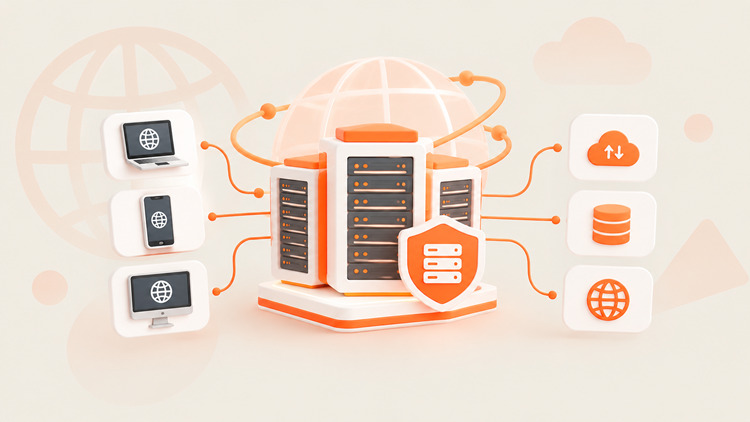
- IP allocation: The proxy provider obtains IP ranges from data centers and hosting companies.
- Request routing: You enter a URL or run a script. Your request goes to the proxy server first. You authenticate with a username and password, or with an allowlisted IP.
- Target response: The website sees the proxy's IP address instead of yours. It replies to the proxy. The proxy passes the data back to you.
Want to test it? Run this command with your own proxy details: 🧪
curl -x "http://USERNAME:PASSWORD@PROXY_HOST:PORT" https://ipvibe.com/ipThe response should show the proxy's IP address, not yours.
Good to know: A proxy hides your IP from the target site. It is not a VPN, and it does not add encryption on its own. Your provider can also see your connection details. Choose a trusted provider. 🔐
Why are datacenter proxies usually faster than residential ones? 🏎️ Data centers connect to high-bandwidth, low-latency networks. Traffic runs on server-grade hardware. It does not pass through home routers or consumer devices.
Now let's look at the different kinds of datacenter proxies. 👇
🧩 Types of Datacenter Proxies
Datacenter proxies vary by routing role, IP behavior, exclusivity, and protocol.
Forward Proxies vs. Reverse Proxies
A forward proxy sits in front of client devices. It sends outgoing requests to the web and masks the user's identity. A reverse proxy sits in front of web servers. It handles incoming traffic for load balancing, SSL termination, and caching. Datacenter proxies sold for scraping and data collection are forward proxies.
Rotating vs. Static Datacenter Proxies
The right choice depends on one question: do you need fresh IPs, or one stable IP? 🤔
🔄 Rotating Datacenter Proxies
How it works: The network gives you a new IP from a large pool. Depending on your provider's settings, the IP changes on every request or at set intervals.
Why you need it: Sending many requests from one IP triggers rate limits fast. A rotating pool spreads the load across many IPs.
Best for:
- 📊 Public price monitoring
- 🔎 Rank tracking and public search data (test first, as some search engines block datacenter IPs)
- 🗂️ Bulk collection of public web data
💡 Scraping at scale? Try UtaProxy Rotating Datacenter Proxies from $0.4/GB and run large data jobs without the hassle.
📌 Static Datacenter Proxies
How it works: You get a fixed IP address that remains the same throughout your subscription period.
Why you need it: Many platforms expect a consistent connection. If your IP keeps changing, they may log you out or ask for extra verification.
Best for:
- 🛒 E-commerce store management
- 👥 Managing client accounts (always follow each platform's rules)
- 🔌 API integrations that require IP allowlisting
- ⚡ Speed-sensitive apps
💡 Need a stable identity? Get UtaProxy Static Datacenter Proxies from $2.2/IP for reliable, long-term session control.
Public, Shared, and Dedicated Datacenter Proxies
- 🚫 Public proxies are free. They are also slow, unreliable, and risky. Avoid them for anything important.
- 👥 Shared proxies split one IP among a few users. They cost less, but other users' behavior can affect your IP's reputation.
- 🔒 Dedicated proxies give you exclusive use of an IP. Performance and reputation stay under your control.
HTTP/HTTPS vs. SOCKS5 Protocols
HTTP/HTTPS proxies are built for web traffic. They work well with browsers and scraping tools. SOCKS5 proxies work at a lower level. They forward traffic without interpreting web content, and they support both TCP and UDP. That makes SOCKS5 a flexible choice for apps, streaming, and other non-web traffic. 🎯
Once you know the types, the next question is how datacenter proxies compare with other proxy networks. ⚖️
⚖️ Datacenter vs. Residential vs. ISP Proxies: Key Differences
Datacenter and residential proxies are the two best-known options. A third type, the ISP proxy (also called static residential), sits in between. ISP proxies are IPs registered under a consumer ISP but hosted on fast servers. Mobile proxies use IPs from mobile carriers.
| Feature | Datacenter Proxies | ISP Proxies | Residential Proxies | Mobile Proxies |
|---|---|---|---|---|
| IP source | Cloud and hosting providers | Registered to a consumer ISP, hosted on servers | Real home devices on ISP networks | Mobile carrier networks |
| Speed | ⚡ Very fast | ⚡ Fast | 🐢 Moderate, varies | 🐢 Moderate, varies |
| Trust level | ⚠️ Lower (hosting ASN) | 🛡️ High (ISP ASN) | 🛡️ Very high | 🛡️ Very high |
| Typical pricing model | Per IP or per GB | Usually per IP | Usually per GB | Usually per GB |
| Best for | High-volume scraping of open sites, speed-sensitive tasks | Stable sessions that need a more trusted IP | Scraping protected sites, geo-specific data | Highly protected, mobile-first platforms |
Detection risk also depends on the target site, your request behavior, and the quality of the IP pool. Treat this table as a general guide. 📌
Next, let's see why some websites block datacenter IPs so quickly. 🚧
🚧 Why Do Websites Detect Datacenter Proxies?
Datacenter IPs are easy to spot for three main reasons:
- 🔍 ASN lookups: Anti-bot systems keep lists of known hosting ASNs and IP ranges. A lookup takes milliseconds.
- 🧱 Subnet clustering: Datacenter IPs often sit in neighboring blocks. If one IP misbehaves, the site may block the whole range.
- 🤖 Traffic patterns: Very fast, repetitive requests look automated, whatever the IP type.
This is why the next step, choosing the right proxy type, matters so much. 👇
🧭 How to Choose the Right Proxy Type
Use this quick framework:
- 🔄 Choose rotating datacenter proxies to collect large volumes of public data from sites with basic protection.
- 📌 Choose static datacenter proxies for store management, allowlisted APIs, or any task that needs one stable IP.
- 🛡️ Try ISP or residential proxies if your target uses advanced anti-bot systems (like Cloudflare or Akamai) and blocks hosting ranges.
- 🧪 Mix both for large projects. Send easy requests through datacenter IPs. Send hard targets through residential IPs. It saves money.
Now let's look at where datacenter proxies deliver the most value. 💼
💼 Primary Use Cases: When Should You Use Datacenter Proxies?
Datacenter proxies shine when speed and volume matter more than a high IP trust score:
- 🕷️ High-speed web scraping: Collect public data from sites with basic security. Fast response times keep your scrapers running smoothly.
- 📈 SEO and market research: Track keyword rankings and compare competitor prices across regions without hitting rate limits.
- 🏷️ Price aggregation: Gather product and travel prices from many sources at scale.
- 📢 Ad verification and brand protection: Check that ads display correctly and affiliate links work in different regions.
- 🛒 Store and account management: Use dedicated static IPs to keep sessions stable and avoid unexpected logouts.
- 🧪 Application testing: Simulate traffic from different locations to test performance and response times.
Every tool has trade-offs. Here are the main ones. ⚖️
✅ Pros and Cons of Datacenter Proxies
Pros
- ⚡ Speed: Server-grade hardware and high-bandwidth connections give low latency and high throughput.
- 💰 Low cost: Datacenter IPs are cheaper to obtain and scale than residential IPs.
- 📦 Scalability: Providers can offer large IP pools for big scraping jobs.
- 🔧 Reliability: Servers do not depend on home devices going on and offline. Many providers advertise high uptime, so check the SLA.
Cons
- 🚫 Higher block rates: Advanced anti-bot services can spot hosting ASNs and block them quickly.
- 🧱 Subnet bans: One abusive IP can get a whole neighboring range blocked.
- 🕵️ Lower trust: Datacenter IPs do not look like ordinary home users. Many streaming services and strict platforms restrict them.
How do you pick a provider you can rely on? Use this checklist. 👇
🔍 How to Choose a Datacenter Proxy Provider
- 🌍 IP pool size and subnet diversity: More subnets mean less risk from range-wide bans.
- 📍 Locations: Check that the countries you need are available.
- 🔄 Rotation controls: Look for per-request and timed rotation options.
- 🔌 Protocols and authentication: HTTP/HTTPS, SOCKS5, username/password, and IP allowlisting.
- 💵 Transparent pricing: Know whether you pay per IP or per GB.
- 🧪 Trial or test option: Test the proxies on your real targets before you commit.
- 🛟 Support and uptime: Look for clear uptime commitments and responsive help.
Ready to get started? Setup takes only a few minutes. 🚀
Ready to speed up your data collection?
Sign up with UtaProxy to claim your $1 starter bonus, request a free proxy trial, and start using rotating or static datacenter proxies today.
🛠️ How to Get and Use Datacenter Proxies
- Sign up and claim your bonus: Create a UtaProxy account and get an instant $1 registration bonus. You can also submit a short request form in your dashboard to access a free proxy trial.
- Select a plan: Go to
Dashboard → Buy → Plans & Pricing. Choose Rotating Datacenter Proxies for scraping, or Static Datacenter Proxies for dedicated sessions. - Get your credentials: Generate your proxy list. Copy the IP address, port, username, and password.
- Add them to your tools: Paste the details into your anti-detect browser, scraping script, or automation tool.
- Test the connection: Run a quick IP check (like the
curlcommand above) to confirm your traffic goes through the proxy.
🎁 Pro tip: Pair rotating IPs with realistic request headers and sensible delays between requests. It reduces detection risk on more complex sites.
A few habits will keep your projects smooth and safe. 👇
🤝 Using Datacenter Proxies Responsibly
Proxies are legitimate tools. What matters is how you use them.
- ✅ Focus on public data that does not require a login.
- 🤖 Check the site's robots.txt file and terms of service.
- 🐢 Throttle your requests so you do not overload the target site.
- 🔒 Be careful with personal data. Laws like the GDPR and CCPA may apply.
- ⚖️ For large or commercial projects, get advice from a qualified lawyer.
Still have questions? Here are the most common ones. 👇
❓ Frequently Asked Questions (FAQ)
What is the difference between datacenter and residential proxies?
Datacenter proxies use IPs from hosting companies. They are faster and cheaper. Residential proxies use IPs from real home connections. They look more like ordinary users, so strict sites block them less often. They also cost more.
Are datacenter proxies legal?
Yes, in most countries. Proxies are legitimate networking tools. Legality depends on what you do with them. Collecting public, non-personal data is generally lower-risk. Breaking a site's terms, accessing private data, or misusing personal data can create legal problems. This is general information, not legal advice.
Are datacenter proxies safe?
Reputable paid providers are generally safe to use. Free public proxies are risky. They can be slow, unreliable, or unsafe. Also remember that a proxy is not a VPN and does not encrypt your traffic on its own.
Why are datacenter proxies cheaper than residential proxies?
Providers can obtain datacenter IPs in bulk from hosting companies. Residential proxies need bandwidth from real consumer connections. That is harder to source and maintain.
Can datacenter proxies get blocked?
Yes. Sites with strict anti-bot systems can flag hosting IP ranges. To reduce blocks, rotate IPs, slow your request rate, use realistic headers, and switch to ISP or residential proxies for high-security targets.
What is the difference between a datacenter proxy and a VPN?
A proxy routes traffic from a specific app or tool. It is often used for scraping and automation. A VPN usually routes and encrypts all device traffic. Proxies are typically better for large-scale, per-request IP control.
🏁 Final Verdict
Datacenter proxies are one of the most cost-effective, high-speed options for web scraping, price monitoring, and stable account or store management. Choose rotating pools for high-volume data collection. Choose static IPs when you need session stability. For heavily protected sites, add ISP or residential proxies to your toolkit.
Daniel Carter
Proxy & Web Data Specialist
Daniel Carter is a Proxy & Web Data Specialist at UtaProxy, focusing on proxy technology, web data collection, and online infrastructure. He writes practical guides and in-depth insights to help businesses understand proxy solutions, choose the right proxy type, and build more reliable data workflows.
You May Also Be Interested
What Is a Proxy Server? How It Works, Types & Uses (2026 Guide)
Confused about proxy servers? See exactly how they work, the 4 main types, and when to use one over a VPN — explained simply, with real use cases.


What Are Residential Proxies? How They Work, Types & Use Cases (2026 Guide)
Learn what residential proxies are, how they route through real home IPs, all proxy types, top use cases, and how to pick a safe provider in 2026.