








How to View Google Search Results From Another Country: The Step-by-Step Guide
You search on Google. You expect the same results as everyone else. But you don't get them. 🌍
Google reads your location and serves results tailored to it. Typing google.co.uk or google.co.jp into your browser won't fix that. So how do you see what people in the UK, Japan, or Germany actually see?
This guide shows you how to view Google search results from another country with 8 practical methods. You'll learn what works, what doesn't, and which method fits your goal. From quick browser tweaks to business-grade proxy setups, it's all here. ✅
⚡ Key Takeaways (TL;DR)
- 📍 Google uses your location, not the domain. Country domains like google.fr no longer change your results.
- 🆓 Free, quick options: Google's Search Region setting, the
glandhlURL parameters, and Chrome DevTools.- 📊 Best for your own site: The Country filter in Google Search Console shows your real rankings by country.
- 🏢 Best for scale: Rank trackers and UtaProxy SEO monitoring proxies help you collect location-based SERPs across many markets.
- ⚠️ No method is perfect. Google mixes many signals. Always test in a clean browser session.
🔍 Why Google Shows Local Results (And Why Changing the Domain Doesn't Work)
Google wants to show the most relevant results for you. Your location is a big part of that. Understanding the signals helps you pick the right method.
📡 Location Signals Google Uses
Google estimates where you are from several signals. These include your IP address, your device location, your Google Account settings, and your past activity. It then adjusts organic results, local packs, and ads to match.
🌐 The Country-Domain Myth
Years ago, visiting google.co.uk gave you UK results. Not anymore. Google now serves the same locally relevant results on google.com and on country domains. What you see depends on your location, not on the address you type.
👤 Personalization Factors
Your results also change with your language settings, search history, cookies, and signed-in account. These signals keep you tied to your home market. You need to override or avoid them.
Now let's look at who needs this and why.
🎯 Why View Google Search Results From Other Countries?
Seeing foreign SERPs is a core task for many teams. Here are the most common reasons:
- 📈 International SEO: Check rankings, featured snippets, and local packs in each target market.
- 🛒 Cross-border e-commerce: Study local search intent, competitors, and trending products.
- 📣 Ad verification: Confirm that your ads and landing pages show correctly in each region.
- ✍️ Content localization: Learn the words and phrases local users actually search for.
- 🕵️ Competitor research: See how rivals appear in markets you plan to enter.
🚀 Need Local SERP Data Across Many Countries?
Skip the manual work. UtaProxy Residential Proxies route your requests through 100M+ real home IPs in 200+ countries. See local results the way real users see them.
🛠️ 8 Methods to View Google Search Results From Any Country
The methods below run from quick free tweaks to professional workflows. Each one includes steps, best use cases, and limits, so you can choose fast.
Method 1: Change the Search Region in Google Settings (Free & Quick)
Google lets you pick a region for your search results. It's the fastest place to start. 🚀
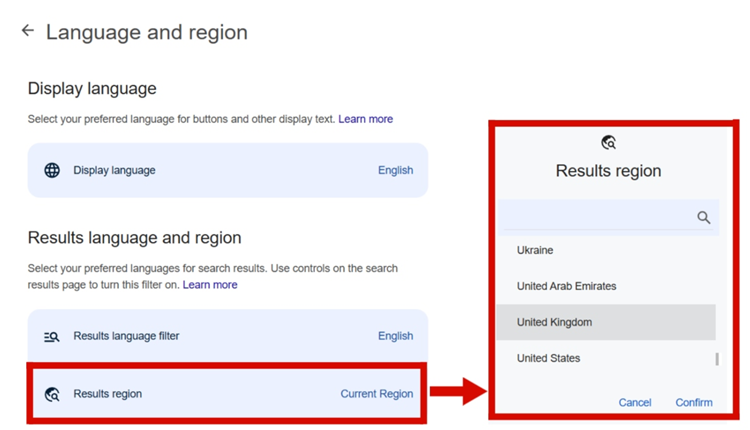
💻 On Desktop
- Open Google Search settings.
- Scroll to Results region.
- Select your target region.
- Click Comfirm at the bottom of the page.
🤖 On Android
- Open the Google app.
- Tap your profile picture in the top right.
- Go to Settings > Language & region > Search region.
- Tap the region you want.
🍎 On iPhone or iPad
- Open the Google app.
- Tap your profile picture in the top right.
- Go to Settings > Other Settings > Language and region settings.
- Under Region for Search Results, choose a region.
- Tap Save.
- ✅ Best for: Quick, casual checks.
- ⚠️ Limits: Google says the option isn't available for every location. It also doesn't change your IP address, so local signals may still appear.
Method 2: Use URL Parameters (gl, hl, and uule)
You can steer results by adding parameters to the end of a Google search URL. No tools needed. 🔧
gl: Sets the country using a two-letter code. Example:gl=gbfor the United Kingdom.hl: Sets the interface language. Example:hl=enfor English.uule: An encoded location value for city-level targeting. It needs a generator, because the value must be encoded.
Example URL:
https://www.google.com/search?q=best+coffee+maker&gl=gb&hl=en
Here's how to use it:
- Run a normal Google search.
- Add
&gl=and your country code to the URL. - Add
&hl=and your language code. - Press Enter and review the results.
- ✅ Best for: Fast country-level spot checks.
- ⚠️ Limits: Google has never published one official spec for these parameters. They can behave inconsistently, and Google still weighs your real IP. Use them as a quick check, not as proof.
Method 3: Simulate a Location With Chrome DevTools
Chrome can override your browser's reported coordinates. It's handy for testing local results. 🧪
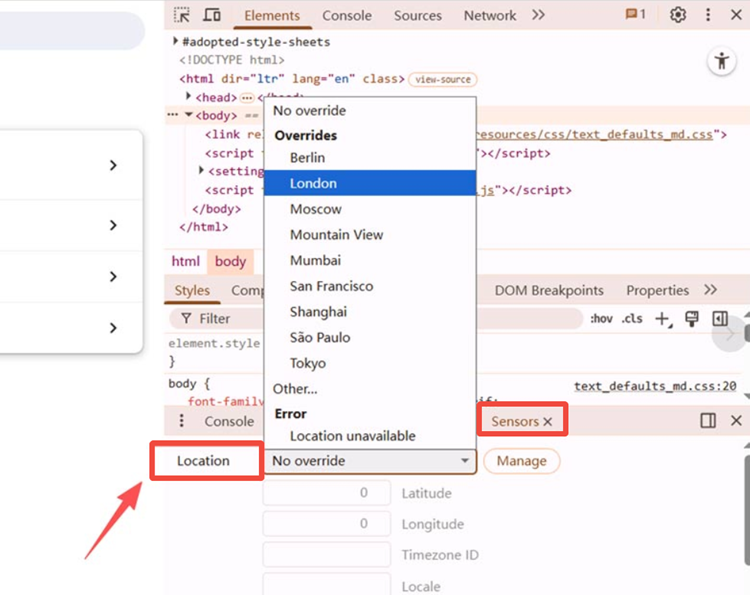
- Open Chrome and press
F12(or right-click and choose Inspect). - Press
Ctrl + Shift + P(Cmd + Shift + Pon Mac) to open the Command Menu. - Type Sensors and select Show Sensors.
- Under Location, pick a preset city or choose a custom location.
- For a custom location, enter the latitude and longitude. Example: London is about
51.5074, -0.1278. - Keep DevTools open and reload Google.
- If Google asks to use your location, allow it.
- ✅ Best for: Developers and marketers testing local queries.
- ⚠️ Limits: It only changes the browser's location signal, not your IP address. It works only while DevTools stays open. Google may still favor your IP.
Method 4: Use Free SERP Checker Tools
Online tools can simulate a search from a chosen country, city, language, and device. No setup required. 🖱️
- Examples: I Search From, Valentin.app, and BrightLocal's local search results checker. Features and free limits change, so check each tool first.
- How they work: Enter your keyword, pick a location, and view a snapshot of the results.
- 👍 Pros: Fast, simple, and no browser changes.
- 👎 Cons: Free plans have usage limits. Results are often static snapshots, not live pages you can click through.
Method 5: Use a VPN
A VPN sends your traffic through a server in another country. Google then sees an IP from that country. 🔒
- Install a VPN and connect to a server in your target country.
- Open a private (incognito) window.
- Sign out of your Google Account.
- Set your browser language to match the country.
- Search on Google.
- 👍 Pros: Easy to set up. Changes your IP for the whole device.
- 👎 Cons: Many VPN IPs are shared, so Google may show CAPTCHAs. City-level targeting is often limited. Some VPNs also leak your real location through WebRTC or DNS.
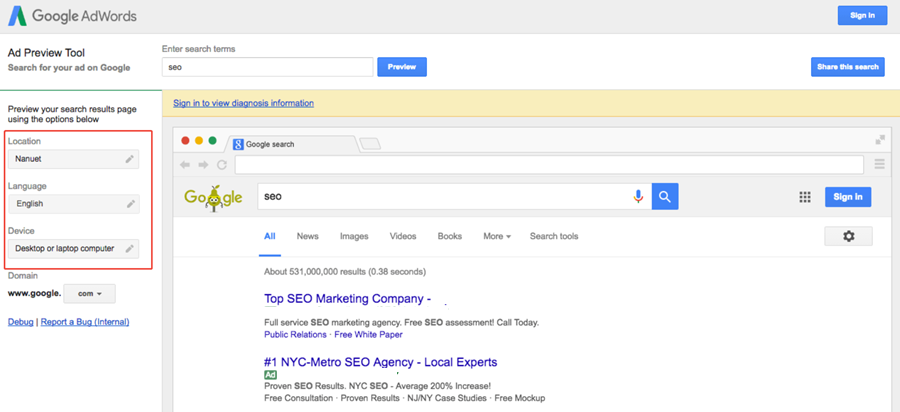
Method 6: Use Google Ads Ad Preview and Diagnosis
Advertisers can preview Google search results for a chosen location without inflating impressions. 📣
- Sign in to your Google Ads account.
- Open Tools > Troubleshooting > Ad preview and diagnosis.
- Select your location, language, and device.
- Enter your search term and review the preview.
- ✅ Best for: Checking how ads appear in a target market.
- ⚠️ Limits: It needs a Google Ads account. It's built for ads, so treat organic results in the preview as a reference only.
Method 7: Use Google Search Console (Best for Your Own Site)
Want to know how your site really performs abroad? Don't simulate it. Look at real data. 📊
- Open Google Search Console and choose your property.
- Go to Performance > Search results.
- Click + New and choose Country.
- Select the country and review clicks, impressions, CTR, and average position.
- ✅ Best for: Measuring real rankings per country for sites you own.
- ⚠️ Limits: You only see data for your own verified site. You can't view competitors or the live SERP layout.
Method 8: Use Residential Proxies (Best for Businesses and SEO Teams)
Need to check hundreds of keywords across many countries? Manual methods break down fast. Residential proxies are built for this. 💼
A residential proxy routes your request through a real home internet connection in your target location. Google sees an ordinary local user, not a data-center server.
✅ Why Teams Choose Residential Proxies
- 🌍 Real local IPs: Collect SERPs from the location you choose.
- 🛡️ Fewer blocks: Residential IPs are less likely to trigger CAPTCHAs than shared data-center IPs.
- 🤖 Automation-ready: Connect them to rank trackers, Python scripts, and headless browsers like Playwright or Puppeteer.
- 📍 Flexible targeting: Pick a country, state, city, or ASN.
🔥 The UtaProxy Solution
UtaProxy Residential Proxies give you access to 100M+ real consumer IPs in 200+ countries. Use them to gather organic listings, map packs, shopping ads, and knowledge panels from the markets that matter to you. SEO monitoring proxies enable reliable and repeatable ranking tracking.
👉 Ready to See Real Local SERPs?
Start with UtaProxy Residential Proxies and test your first market today.
🧭 Best Practices for Proxy-Based SERP Checks
- 🔄 Rotate IPs when you run many queries. It spreads requests and lowers the chance of rate limits.
- 🗣️ Match language to location. Pair a Japanese IP with
hl=ja, for example. - 🧠 Use a real browser. Google requires JavaScript to show results, so use Playwright, Puppeteer, or a SERP API instead of plain HTTP requests.
- 📜 Follow the rules. Google's terms restrict automated queries. Review them, keep request rates reasonable, and consider a licensed SERP API for production use.
That's all eight. Here's how they compare side by side.
📊 Which Method Should You Choose?
Use this table to match the method to your goal:
| Method | Location Accuracy | Ease of Use | Best For | Automation |
|---|---|---|---|---|
| 1. Search Region setting | Low–Medium | Very easy | Casual checks | ❌ No |
| 2. URL parameters (gl, hl, uule) | Medium | Easy | Quick country or city tests | ⚠️ Limited |
| 3. Chrome DevTools | Medium | Moderate | Local SEO testing | ❌ No |
| 4. Free SERP checkers | Medium–High | Very easy | Quick spot-checks | ❌ No |
| 5. VPN | Medium–High | Easy | General browsing | ❌ No |
| 6. Google Ads Ad Preview | High (ads) | Moderate | Ad verification | ❌ No |
| 7. Google Search Console | Real user data | Easy | Your own site's country performance | ✅ Via API |
| 8. UtaProxy Residential Proxies | High (real local IPs) | Professional | Rank tracking, SERP research, and market analysis at scale | ✅ Yes |
Whichever method you choose, these tips will make your results more reliable.
💡 Pro Tips for More Accurate Results
🕶️ Tip 1: Use Incognito or Private Mode
Private windows start without your cookies and history. That reduces personalization.
🗣️ Tip 2: Match Language and Location
Checking Germany? Use a German IP and set your language to German (de-DE). Mismatched signals can change the SERP layout.
🚪 Tip 3: Sign Out of Your Google Account
A signed-in account carries your saved location and history. Sign out before you test.
🔐 Tip 4: Prevent WebRTC and DNS Leaks
Leaks can reveal your real network location even when you use a VPN or proxy. Disable WebRTC leaks in your browser and run a leak test before you start.
📸 Tip 5: Verify With a Second Method
Run the same query with two methods. If the results match, you can trust them more. If they differ, dig deeper.
Still have questions? Here are the answers to the most common ones.
❓ Frequently Asked Questions (FAQ)
Why does Google still show my local results when I use a VPN?
Google uses more than your IP. Cookies, your signed-in account, browser language, and WebRTC or DNS leaks can all reveal your home location. Clear your cookies, sign out, use incognito mode, and test for leaks. If problems continue, try residential IPs.
Does changing the Google domain (like google.fr) change my location?
No. Google serves results based on your detected location, not the domain. Visiting google.fr or google.de won't give you French or German results by itself.
How can I see Google results for a specific city?
Combine a local IP with a city-level signal. Use a proxy or VPN with city targeting, or add a uule value to the search URL. Then confirm the location Google shows at the bottom of the results page.
What's the best way to check rankings in another country?
For your own site, use the Country filter in Google Search Console. For competitors or live SERPs, use a location-based rank tracker or residential proxies.
Is it legal to view Google results from another country?
Viewing results with a VPN, a setting, or a proxy is a common practice. Automated scraping is different, because Google's terms restrict it. Read the terms that apply to you and consider a licensed SERP API. This isn't legal advice.
How do SEO agencies track rankings across multiple countries?
Most use rank-tracking software or SERP APIs, often backed by location-based proxy networks such as UtaProxy. These tools collect results per country and city on a schedule, so teams can compare markets over time.
✅ Final Thoughts: Pick the Right Method for Your Goal
The best way to view Google search results from another country depends on your task. For one-off checks, the Search Region setting, URL parameters, or a free SERP checker are enough. For your own site's performance, use Google Search Console.
For ongoing rank tracking, competitor research, and multi-market analysis, manual tricks fall short. You need real local IPs and a repeatable setup. UtaProxy Residential Proxies give you that foundation. Try UtaProxy today and see your target market the way your customers do. 🌟

Daniel Carter
Proxy & Web Data Specialist
Daniel Carter is a Proxy & Web Data Specialist at UtaProxy, focusing on proxy technology, web data collection, and online infrastructure. He writes practical guides and in-depth insights to help businesses understand proxy solutions, choose the right proxy type, and build more reliable data workflows.