








What Are ISP Proxies? A Plain-English Guide to Static Residential Proxies (2026)
Choosing a proxy often feels like a trade-off. 🤔 Datacenter proxies are fast, but websites detect them easily. Rotating residential proxies look like real home users, but their IPs keep changing, and you usually pay by the gigabyte.
So, what are ISP proxies? An ISP proxy is an IP address registered to a consumer internet service provider (ISP), such as AT&T or Comcast, but hosted on a fast datacenter server. Websites see a home-style IP. You get datacenter speed and an IP that stays the same. Many providers also call them static residential proxies.
This guide explains how ISP proxies work, what they cost, where they fit, and where they don't. 🚀
⚡ Key Takeaways
- 🏠 Definition: An ISP proxy uses an IP address registered to an ISP, but it runs on a datacenter server.
- ⚖️ Hybrid strengths: You get residential-style trust plus datacenter-grade speed and stability.
- 📌 Static IPs: The IP stays yours for the whole plan, which suits long login sessions.
- 💵 Flat pricing: Most providers charge per IP and duration, not per gigabyte.
- ⚠️ Not magic: ISP proxies can still be blocked, and their IP pools are smaller than rotating residential networks.
🔍 What Are ISP Proxies?
An ISP proxy is a proxy server that uses an IP address assigned by, or leased from, a commercial internet service provider. The difference is where it runs. A normal residential IP lives on a home router. An ISP proxy runs inside a datacenter.
- 🏷️ IP source: The address is registered to a recognized consumer ISP.
- 🖥️ Hosting: The physical server sits in a datacenter, not in someone's home.
- 🎯 Result: Websites see a residential-style ISP address, while you get fast, stable connections.
To see why this works, look at how the technology is built.
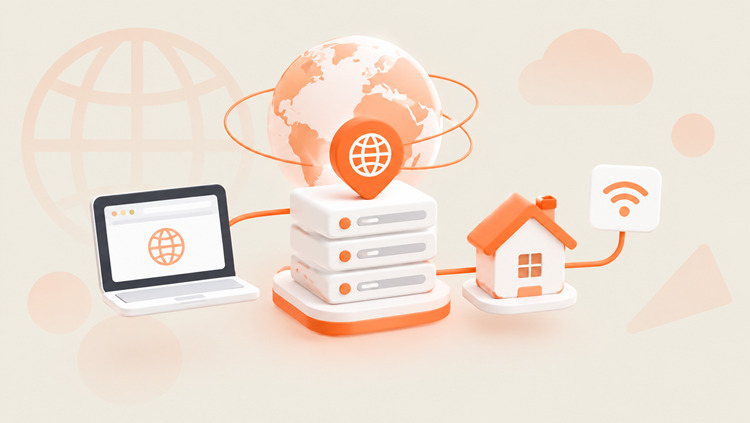
⚙️ How ISP Proxies Work
ISP proxies rely on two things: Autonomous System Numbers (ASNs) and datacenter infrastructure.
ASN: The Label That Builds Trust
Every IP address belongs to an Autonomous System Number (ASN). The ASN tells websites who owns the IP. Security systems check it on every visit.
- ☁️ If the ASN belongs to a cloud host like AWS or DigitalOcean, many sites treat the traffic with suspicion.
- 🏠 If the ASN belongs to a consumer ISP like Comcast, Verizon, or AT&T, the traffic looks like an ordinary user.
ISP proxies use the second kind of ASN. That is why anti-bot systems often treat them more kindly than datacenter IPs.
Datacenter Infrastructure: The Speed and Stability
Rotating residential proxies route traffic through real home devices. Those devices can be slow or go offline. ISP proxies skip that step. They run on servers in datacenters with fast uplinks (often 1 Gbps or more). That gives you quick responses and steady connections.
A Quick Look at the Request Flow
- Your app or browser connects to the proxy server.
- The proxy forwards your request to the target website.
- The website sees the ISP-registered IP, not yours.
- The response returns to you through the same path.
Why They Are Also Called "Static Residential Proxies"
"ISP proxy" and "static residential proxy" describe the same type of product. Static residential was the older name. "ISP proxies" is now more common, but both terms appear side by side. The word static means the IP stays assigned to you for your whole plan. That matters for long sessions, where an IP change can trigger security checks or logouts.
Next, let's look at how providers allocate these IPs.
👥 Shared vs. Dedicated ISP Proxies
Providers usually sell ISP proxies in two allocation types.
Shared ISP Proxies
Several users share the same IP address. Costs are split, so the price is lower.
- ✅ Best for: Light browsing, public data collection, market research, and budget projects.
- ⚠️ Watch out: Another user's behavior can affect the IP's reputation.
Dedicated ISP Proxies
Only you use the IP address. No other customer sends traffic through it. That removes the "bad neighbor" risk.
- ✅ Best for: Store management, important social accounts, ad accounts, and business-critical workflows.
- 💡 Trade-off: They cost more per IP.
🚀 Try Static Residential Proxies from UtaProxy
Need clean, stable ISP IPs? UtaProxy Static Residential Proxies offer both shared and dedicated options. Choose a 7-, 30-, or 60-day plan. Connect with HTTP(S) or SOCKS5, and prices start from $3 per IP.
Now let's compare ISP proxies with the other main proxy types.
🆚 ISP Proxies vs. Datacenter vs. Residential Proxies
Each proxy type has its own strengths. The table gives a quick overview.
| Feature | Datacenter Proxies | Rotating Residential Proxies | ISP Proxies (Static Residential) |
|---|---|---|---|
| IP source | Cloud and hosting companies | Real home devices (opt-in networks) | ISP-registered IPs hosted in datacenters |
| Speed | ⚡ Very fast | 🐢 Varies with the home connection | ⚡ Very fast |
| IP behavior | Static or rotating, depending on the plan | Rotates by default; sticky sessions available | 📌 Static for the plan period |
| Detection risk | ⚠️ Higher | 🛡️ Lowest | 🛡️ Low, but some checkers may still label the IP as hosting |
| IP pool size | Very large | Very large | Smaller |
| Billing | Per IP or per GB | Per GB | Per IP and duration; bandwidth is often unmetered |
📱 What about mobile proxies? Mobile proxies use IPs from mobile carriers. They suit mobile-first platforms, but they usually cost more. This guide focuses on ISP proxies.
ISP Proxies vs. Rotating Residential: How to Decide
The choice usually comes down to two questions.
- 🔒 Do you need the same IP for a long time? Pick ISP proxies. Account logins and long sessions work better with a fixed IP.
- 🌍 Do you need thousands of different IPs? Pick rotating residential proxies. Large-scale scraping and wide geo-coverage suit a big rotating pool.
Every choice has trade-offs, so let's look at the pros and cons.
⚖️ Pros and Cons of ISP Proxies
✅ Advantages
- ⚡ Fast and low-latency: Datacenter servers handle your traffic.
- 🔗 Stable connections: No home router sits in the middle, so drops are less likely.
- 📌 Static IPs: Your IP stays the same, so long login sessions are smoother.
- 🛡️ Strong trust signals: A consumer ISP ASN is less likely to be flagged than a cloud ASN.
- 💵 Predictable costs: Flat per-IP pricing is easier to budget than pay-per-GB.
❌ Disadvantages
- 🌐 Smaller IP pools: There are fewer IPs and locations than in rotating residential networks.
- 💰 Higher cost per IP: They cost more than basic datacenter proxies.
- 🧱 Subnet risk: ISP proxy IPs often sit in the same ranges. If a site blocks one IP, neighbors in that range may suffer too.
- 🔎 Not undetectable: Some IP-lookup tools can still flag the hosting environment. Aggressive traffic can still get an IP blocked.
- 🧭 Easier to profile: A fixed IP builds a history over time, unlike a rotating IP.
Cost is often the deciding factor, so let's look at real numbers.
💵 How Much Do ISP Proxies Cost?
Pricing models differ by proxy type.
- 📦 Rotating residential proxies: Charged per GB. In 2026, prices range from about $1 to $8 per GB or more, depending on the provider and your volume.
- 📌 ISP proxies: Charged per IP and per rental period. Many providers price them at a few dollars per IP per month. Dedicated IPs and premium locations cost more. See static residential pricing →
An illustrative example: Suppose you move 100 GB a month. At $2.5 per GB, a rotating residential plan costs about $250. Twenty ISP proxies at about $4 each would cost about $80, with unmetered bandwidth in many plans. That only works if your task fits a small set of fixed IPs.
Light workloads can go the other way. If you only need a few GB a month, pay-per-GB can be cheaper. Compare the total cost for your workload, not the headline price.
Now let's see where ISP proxies fit best.
🎯 Best Use Cases for ISP Proxies
Static IPs and high trust suit several business scenarios.
1. 🛒 E-Commerce Account Management
Marketplace platforms watch login locations closely. Sudden IP changes can trigger security checks. A dedicated ISP proxy gives each store a consistent network identity. Note: Some platforms restrict multiple accounts. Always read each platform's rules first.
2. 📱 Social Media and Anti-Detect Browsers
Managing several brand or client profiles needs consistent environments. Pair one static IP with one anti-detect browser profile (for example, AdsPower or Multilogin). Keep each profile's IP, timezone, and language consistent. Instagram and TikTok workflows often use this setup.
3. 🕸️ Web Scraping With Logins
Some sites require you to sign in. Rotating IPs can break your session and log you out. A static IP keeps your cookies and session alive. Lightweight data collection then runs quickly. For very large crawls that need thousands of fresh IPs, use a rotating pool instead. See web scraping proxies for options.
4. 📊 Ad Verification and Price Monitoring
Teams check how ads and prices appear in different regions. Fast, location-specific IPs help you see what real local users see.
5. 👟 Limited-Release Shopping
Product drops reward speed. ISP proxies pair low latency with residential-style IPs. Retailer rules vary, so check each store's terms before you automate anything.
6. 🔎 SEO Monitoring and Regional QA
Check localized search results and test how your site behaves in different countries. A stable IP keeps your test conditions consistent.
🛠️ How to Set Up ISP Proxies
Follow these steps to configure your static residential proxies.
Step 1: Create an account. Sign up and open your dashboard. Navigate to Buy → Static Residential Proxies.
💡 Try before you buy: You can apply for a free trial from your UtaProxy dashboard. Applications are usually reviewed within 24–48 hours. Read the free trial guide →
Step 2: Choose allocation and duration. Pick Shared or Dedicated based on your risk level. Then choose 7 days (short projects), 30 days (monthly tasks), or 60 days (longer operations).
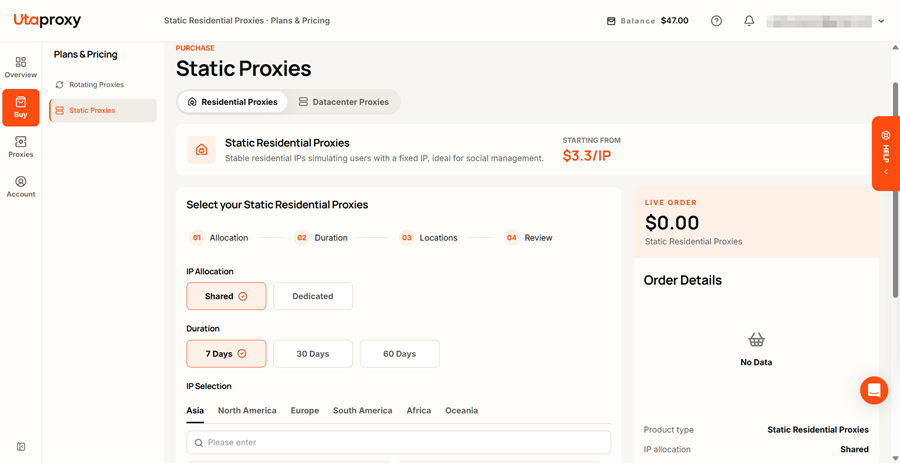
Step 3: Select your location. Pick the country, and where available the state or city, that matches your target audience or accounts.
Step 4: Get your credentials. Go to Proxies → Static Residential Proxies → IP List. Copy the IP address, port, username, and password.
Step 5: Add the proxy to your tool. Enter the details in your anti-detect browser, scraping script, or system settings. A typical format looks like this:
IP:PORT:USERNAME:PASSWORD
Step 6: Test the connection. Visit an IP lookup tool such as ipinfo.io to confirm the IP, location, and ASN. Then start your task.
These habits help you get better results from your proxies.
🧠 Best Practices for Using ISP Proxies
- 🧑💻 Use one profile per identity. Pair each static IP with its own browser profile. Never switch accounts inside the same profile.
- 🌍 Match your settings to the IP. Keep your browser language, timezone, and location consistent with the proxy's location.
- 🔍 Check the IP first. Use a lookup tool like
ipinfo.iobefore sensitive tasks. Confirm the ASN and location look right. - 🐢 Keep request rates reasonable. Aggressive, high-frequency traffic from one IP can still get it blocked. Spread big workloads across several IPs.
- 🚫 Follow the rules. Respect website terms, robots.txt where relevant, and local laws.
Here are quick answers to common questions.
❓ Frequently Asked Questions (FAQ)
What is an ISP proxy in simple terms?
An ISP proxy is a proxy IP registered to a consumer internet provider but hosted on a datacenter server. It looks like a home connection to websites. It runs with datacenter speed and stability.
What is the difference between an ISP proxy and a static residential proxy?
Most providers use the two names for the same thing. Both describe fixed IPs tied to a consumer ISP. Some providers draw finer distinctions, so read the plan description.
Are ISP proxies better than residential proxies?
Neither is better in every case. ISP proxies are faster, more stable, and easier to budget. Rotating residential proxies offer larger IP pools, more locations, and automatic rotation. Choose based on your task.
Can I use ISP proxies with anti-detect browsers like AdsPower or Multilogin?
Yes. Static IPs work well with anti-detect browsers, because each profile can keep one consistent IP.
Are ISP proxies legal?
Using a proxy is legal in most countries. What you do with it matters. Follow local laws and each website's terms of service. Avoid any illegal or abusive activity.
Which is better: shared or dedicated ISP proxies?
Choose shared for light, low-risk tasks and tight budgets. Choose dedicated when account safety, IP reputation, or business-critical work matters.
🏁 Final Verdict
So, what are ISP proxies? They are ISP-registered, datacenter-hosted IPs that combine strong trust signals with fast, stable connections. They fit long sessions, account workflows, and steady data collection well. They are not a cure-all. Pools are smaller, and no proxy is immune to blocks.
Match the proxy type to the job. Then test before you scale. 🎯 If you want reliable static residential IPs with shared and dedicated options, explore UtaProxy Static Residential Proxies or compare plans and pricing. Need a rotating pool for large-scale work? See UtaProxy Rotating Residential Proxies.
Daniel Carter
Proxy & Web Data Specialist
Daniel Carter is a Proxy & Web Data Specialist at UtaProxy, focusing on proxy technology, web data collection, and online infrastructure. He writes practical guides and in-depth insights to help businesses understand proxy solutions, choose the right proxy type, and build more reliable data workflows.
You May Also Be Interested

What Are Residential Proxies? How They Work, Types & Use Cases (2026 Guide)
Learn what residential proxies are, how they route through real home IPs, all proxy types, top use cases, and how to pick a safe provider in 2026.


Datacenter Proxies Explained: Definition, How They Work & When to Use Them
Datacenter proxies are fast, low-cost IPs from cloud servers. Learn how they work, rotating vs static types, pros, cons and when to use them.
What Is a Proxy Server? How It Works, Types & Uses (2026 Guide)
Confused about proxy servers? See exactly how they work, the 4 main types, and when to use one over a VPN — explained simply, with real use cases.