








Can You Have Multiple Instagram Accounts? How to Manage Them Without Bans
Running one Instagram profile is rarely enough today. 📱 Personal brands, e-commerce stores, and agencies all need more. So the big questions come up fast. Can you have multiple Instagram accounts? How many can you run from one phone? And why do accounts sometimes get restricted together?
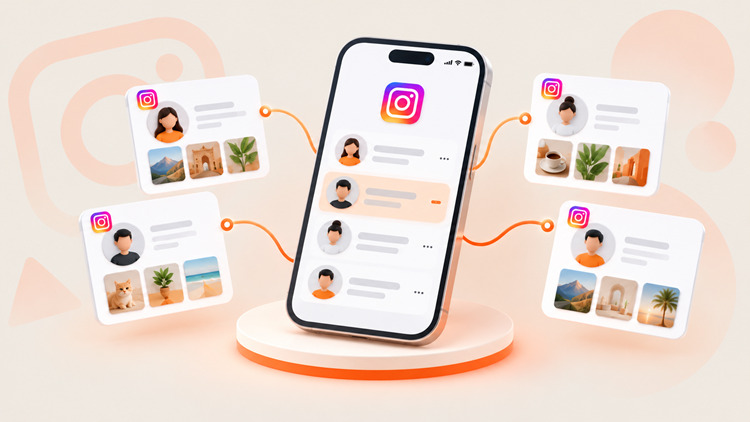
Yes, you can have multiple Instagram accounts. ✅ Instagram's Help Center says you can add and switch between up to 5 accounts in the app on one device. Instagram does not publish a cap on how many accounts you can own in total. But once you pass 5 accounts, or add team members, the official app gets risky and clumsy. At that point, professional teams use scheduling tools, plus anti-detect browsers paired with dedicated proxies, to keep every account isolated.
⚡ Key Takeaways
- ✅ Official limit: The Instagram app lets you stay logged in to up to 5 accounts per device.
- ⚠️ Linking risk: Accounts that share a device, IP address, or contact details can be connected by Meta. If one account is restricted, the others may be affected.
- 🧰 Pro scaling strategy: To manage more than 5 accounts, teams combine official tools with anti-detect browsers and clean, dedicated Instagram Proxies.
- 🚫 Stay compliant: Multiple accounts are allowed. Spam, fake engagement, and ban evasion are not.
Review the comparison table below. 👇 It shows the three main ways to manage multiple Instagram profiles.
| Management Method | How Many Accounts | Best For | Account Safety Level |
|---|---|---|---|
| Native app switching | Up to 5 per device | Personal users, small business owners | Medium. All accounts share one device and IP. |
| Meta Business Suite or SMM platforms (e.g., Buffer, Later) | Depends on the tool and plan | Content scheduling, shared inbox, reporting | Higher. Uses Instagram's official API. Requires Business or Creator accounts. |
| Anti-detect browser + dedicated proxy | No fixed cap. Limited by budget and workflow. | Growth marketers, e-commerce networks, agencies | Highest isolation when set up correctly. It does not protect against policy violations. |
🚀 Scale Your Instagram Network Without Linked-Account Bans
Give every profile its own clean IP. Use UtaProxy Instagram Proxies to access 100 million+ residential and mobile IPs across 200+ regions. Match each account to the right location and keep your network organized.
Before looking at advanced setups, let us examine Instagram's official rules for multi-account use. 👇
📜 Can You Have Multiple Instagram Accounts? Official Rules and Limits
Meta supports multiple accounts. Creators and brands often need separate spaces for different audiences. But some boundaries apply.
👥 Who Needs to Manage Multiple Instagram Accounts?
- 📊 Social media agencies: Marketers who publish content and answer DMs for many clients.
- 🛍️ E-commerce sellers: Retailers who run separate storefront profiles by niche, brand, or region.
- 🎥 Creators and influencers: People who keep a private personal account next to a public brand page.
- 🏢 Business brands: Companies that separate customer support from core marketing.
🔢 How Many Instagram Accounts Can You Have?
You can create and run multiple Instagram accounts without breaking platform rules. Instagram does not publish a total limit. The published number is 5 accounts signed in at the same time in the app.
Need more than 5? You have three options:
- 🔄 Log out of one account before adding another.
- 📲 Use more than one device.
- 💻 Use official business tools or an isolated browser setup (covered below).
🔗 What Is Meta Accounts Center?
Meta Accounts Center lets you link accounts across Meta apps, such as Instagram and Facebook. It helps you manage shared settings and sign-in options. But linking is not the same as switching. The in-app switcher still stops at 5 accounts. Linking also creates a visible connection between your profiles in Meta's systems.
📧 Can You Use the Same Email or Phone Number for Multiple Accounts?
Every Instagram profile needs a unique username. Instagram may let you reuse an email address or phone number in some cases, and the rules can change. Even when it works, shared contact details can help Meta connect your accounts. If one account gets flagged, the others may face extra scrutiny. 🚩
So use a unique email address and phone number for every business profile.
🗂️ Types of Instagram Accounts
Instagram offers three account types:
- 🙋 Personal accounts: Standard profiles for everyday use. They have no professional analytics and no scheduling API access.
- 🌟 Creator accounts: Built for public figures and influencers. They include audience insights and creator-focused messaging tools.
- 💼 Business accounts: Built for brands. They unlock Instagram Shopping, ads, contact buttons, and third-party scheduling tools.
Creator and Business accounts are both called professional accounts. Most scheduling tools require one of them.
Let us go over how to set up and switch accounts in the official app. 👇
📱 How to Manage Multiple Instagram Accounts in the Official App (Step by Step)
Managing up to 5 profiles in the app is simple. Follow these steps.
Step 1: Add a Second (or Third) Account
- Open the Instagram app on iOS or Android.
- Tap your profile picture in the bottom right corner.
- Tap the menu icon (three lines) in the top right corner, then tap Settings and activity.
- Scroll to the bottom and tap Add account.
- Choose Log into existing account or Create new account.
- Enter your credentials and complete any two-factor prompts.
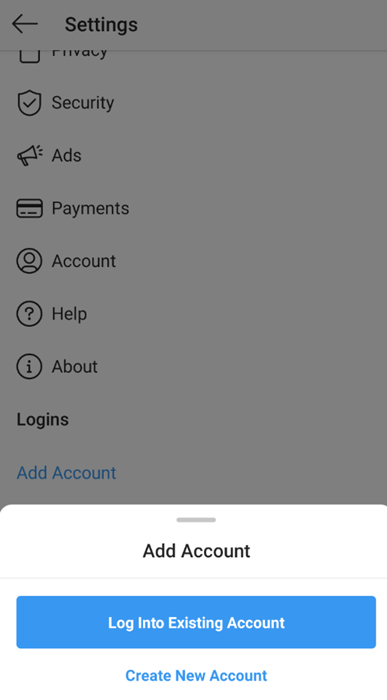
💡 Menu names change between app versions. You can also tap your username at the top of your profile to find the add-account option. If it is missing, update the app.
Step 2: Switch Between Accounts
- 👆 Username method: Go to your profile, tap your username at the top, then pick an account from the list.
- ⏱️ Long-press method: Press and hold your profile picture in the bottom right corner, then choose an account.
Step 3: Tame Your Notifications
By default, you may get push notifications from every account you add. 🔔 That gets noisy fast. Open Settings and activity > Notifications on each profile. Mute likes and follower alerts on client accounts. Keep DMs and comments on.
Step 4: Remove an Account When You Hit the Limit
Want to add a sixth account? Switch to the account you want to remove. Then open the settings menu and tap Log out. This frees a slot. Your account and its content stay intact.
✅ Pros and ❌ Cons of Native In-App Management
- ✅ Pros: Free, easy to set up, full access to Stories, Reels, and Live.
- ❌ Cons: Capped at 5 accounts per device. No bulk scheduling. All accounts share the same device and network signals.
These limits lead to the hidden risks of running many accounts on one machine. 👇
⚠️ The Hidden Risks of Managing Multiple Instagram Accounts on One Device
The app allows 5 logged-in accounts. But pushing that limit on one phone can lead to unexpected restrictions.
🔗 Account Linking and Chain Restrictions
Meta does not publish how it detects related accounts. But device identifiers, IP addresses, contact details, and behavior patterns are widely seen as key signals. Accounts that share them are easy to connect.
This matters because of Meta's Account Integrity rules. Meta says it can restrict or remove accounts owned by the same person as an account that was disabled. So a serious violation on one account can put the others at risk. 😬
🚧 Action Blocks and Reach Drops
Fast activity from many accounts on one IP can look automated. Picture Instagram automatic likes, comments, and posts landing within seconds of each other. You may see "Action Blocked" messages, repeated security checks, or lower reach. Some marketers call this a shadowban. Instagram does not use that term officially.
👨💻 Team Collaboration Roadblocks
Sharing one phone across a remote team does not work. Handing out client passwords is risky. It can cause lockouts, security checkpoints, and password leaks. 🔐
To manage more than 5 accounts safely, you need professional-grade tools. 👇
🛡️ How to Scale and Manage 5+ Instagram Accounts Securely (Pro Strategy)
At 10, 50, or hundreds of accounts, pro teams drop native switching. They build a layered setup instead.
1. 🗓️ Use Official Tools and SMM Platforms for Scheduling
Meta Business Suite is Meta's free tool for managing connected professional accounts. Third-party SMM tools also connect through Instagram's official API. Both let you plan, schedule, and publish without logging in to each account by hand. They also support team permissions, so you do not need to share passwords.
| Tool Category | Example Platforms | Core Functions |
|---|---|---|
| Official suite | Meta Business Suite | Free scheduling, inbox, and insights for connected professional accounts. |
| Content schedulers | Later, Buffer, Hootsuite | Visual planning and auto-publishing for posts and Reels. |
| Unified social inboxes | NapoleonCat, Sprout Social | DMs, inquiries, and comments from many accounts in one dashboard. |
| Analytics and reporting | Iconosquare, Metricool | Audience data, engagement audits, and client reports. |
Feature support differs by tool and plan. Check whether Stories and Reels are supported before you buy.
2. 🖥️ Use Anti-Detect Browsers for Environment Isolation
Scheduling tools cannot do everything. Manual engagement, profile setup, and some Story features still need a real login. For those tasks, marketers use anti-detect browsers like AdsPower, GoLogin, Multilogin, and Dolphin{anty}.
An anti-detect browser creates separate browser profiles. Each has its own cookies, Canvas, WebRTC, AudioContext, and User-Agent settings. This makes every account look like it runs on its own computer. Want a full comparison? Read our guide to the best antidetect browsers. 🔍
3. 🌐 Pair Every Profile with a Clean Proxy (The Most Critical Step)
An anti-detect browser isolates browser signals. It does not hide your network identity. If 20 isolated profiles connect through the same home Wi-Fi IP, they still share one IP address. That is an easy link for Meta to spot.
For true isolation, run each browser profile behind its own dedicated proxy:
- 📶 Mobile proxies (4G/5G), recommended: Instagram is mobile-first. Many real phone users share carrier IP pools through CGNAT. So mobile IPs often earn higher trust and are less likely to be blocked.
- 🏠 Static ISP residential proxies: These IPs combine datacenter speed with ISP-issued addresses. A dedicated static IP stays the same over time. That makes it a good fit for long-term core business accounts.
⚙️ Pro setup rules: use one proxy per account. Match the proxy location to the account's region. Keep each account on a stable IP while you work. If you use rotating mobile proxies, avoid changing IPs in the middle of a session.
🔒 Protect Your Account Portfolio with UtaProxy
Build a cleaner, safer multi-account setup. Pair your anti-detect browser with UtaProxy Static ISP Proxies for long-term accounts. Or choose Rotating Mobile Proxies for mobile-first workflows. Assign a dedicated IP to every Instagram profile in your network. 🚀
Good operating habits keep a growing network healthy. 👇
✅ Best Practices for Growing and Operating Multiple Instagram Accounts
Follow these seven practices to keep your portfolio safe.
1. 🌱 Warm Up New Accounts Gradually
Do not post 20 photos or send 50 DMs on day one. Many marketers spend the first one to two weeks on light, natural activity. Browse the feed, like a few posts, and follow a handful of relevant accounts. Instagram publishes no official warm-up period, so treat this as a safe habit rather than a rule.
2. 🎨 Create Unique Content for Each Account
Do not copy the same posts across every profile. Instagram has said it favors original content in recommendations. So tailor captions, visuals, and angles to each audience. Repost-style duplicates can weaken reach.
3. ⏰ Stagger Your Publishing Schedule
Never publish across 10 accounts in the same minute. Space posts out by at least 15 to 30 minutes. Better still, vary the content and timing per account so activity looks natural.
4. 🔐 Turn On Two-Factor Authentication (2FA) for Every Account
Use an authenticator app such as Google Authenticator or 1Password instead of one shared SMS number. Store backup codes in an encrypted password manager.
5. 👥 Use Permissions, Not Shared Passwords
Give team members access through Meta Business Suite or your scheduling tool. This keeps client logins private and limits the damage from a leak.
6. 🔕 Manage Notification Overload
Mute non-critical alerts for client handles in the app. Keep customer-support DMs visible.
7. 📜 Follow Instagram's Rules
Do not use bots, buy fake engagement, or spam. Never use a new account to dodge a ban. If a decision looks wrong, file an appeal instead.
Check the quick answers below for common multi-account questions. 👇
❓ Frequently Asked Questions (FAQ)
Q1: Can you have multiple Instagram accounts?
Yes. Instagram allows users and businesses to own more than one account. You can stay signed in to up to 5 accounts at once on one device.
Q2: Will Instagram ban me for having multiple accounts?
No. Owning multiple accounts is not a violation by itself. But spam, fake engagement, and using extra accounts to evade a ban can get your accounts restricted or removed.
Q3: Can I use the same email or phone number for multiple accounts?
It may work in some cases, but rules can change. Shared contact details can also help Meta link your accounts. Use unique details for each business profile.
Q4: Can I combine or merge two Instagram accounts?
No. Instagram does not let you merge accounts or transfer followers. To consolidate, tell followers about your new handle through Stories, posts, and bio links.
Q5: Can people see that I own other Instagram accounts?
Not directly. Instagram does not show a public link between accounts. But your other accounts can still appear as suggestions through the recommendation algorithm.
Q6: How do I manage more than 5 Instagram accounts?
Use Meta Business Suite or an SMM tool for scheduling and messaging. For manual tasks, pair an anti-detect browser with dedicated proxies.
Q7: What is the best proxy type for Instagram accounts?
Mobile 4G/5G proxies are a popular choice because Instagram is mobile-first. Static ISP proxies work well for long-term accounts that need a stable IP.
🏁 Final Verdict
The best way to manage multiple Instagram accounts depends on your scale:
- 📱 1 to 5 profiles: The official app's native switching is free, simple, and enough.
- 🗓️ Scheduling and team workflows: Use Meta Business Suite or an SMM platform with team permissions.
- 🛡️ More than 5 profiles, or agency and e-commerce networks: Protect your portfolio with an anti-detect browser paired with clean Instagram Proxies from UtaProxy.
No setup makes policy violations safe. But the right tools help you stay organized and keep accounts separate. Equip your team today and grow your Instagram footprint with confidence! 🚀
Daniel Carter
Proxy & Web Data Specialist
Daniel Carter is a Proxy & Web Data Specialist at UtaProxy, focusing on proxy technology, web data collection, and online infrastructure. He writes practical guides and in-depth insights to help businesses understand proxy solutions, choose the right proxy type, and build more reliable data workflows.
You May Also Be Interested
Can You Have Multiple Twitter Accounts? How to Manage Them Without Getting Banned
Yes, you can have multiple Twitter (X) accounts. Learn X's rules, real account limits, and a safe setup with anti-detect browsers and proxies to avoid bans.

What Are ISP Proxies? A Plain-English Guide to Static Residential Proxies (2026)
What are ISP proxies? Learn how static residential proxies work, how they compare to datacenter and residential IPs, real costs, and the best use cases.
Why Use Mobile 4G/5G Proxies for Instagram Account Creation in 2026? (Complete Guide)
Discover why businesses use 4G/5G mobile proxies for Instagram account creation and management in 2026. Learn benefits, best practices, and proxy setup tips.