








Can You Have Multiple Twitter Accounts? How to Manage Them Without Getting Banned
Running more than one Twitter (X) account is normal in 2026. 📈 Brand marketers, agencies, community managers, and Web3 teams all do it. But X uses strict anti-spam systems. One wrong move can lead to a suspension or a shadowban. And when one account gets flagged, linked accounts may follow. 😬
So, can you have multiple Twitter accounts? ✅ Yes. X lets you own and operate more than one profile, as long as each account has a genuine purpose and follows the platform rules. Doing it safely takes clean account habits and smart technical separation.
⚡ Key Takeaways
- Multiple accounts are allowed. Each account needs its own purpose, such as a personal profile, a brand, or a support channel.
- The app switcher has limits. Guides report that X's app keeps about 5 accounts signed in at once. X's Help Center does not publish a hard cap on total accounts, so check your app for current limits.
- Never fake engagement. Don't post identical content, and don't have your accounts like or retweet each other to boost reach.
- Isolate your accounts. Agencies managing many profiles often pair anti-detect browsers with dedicated proxies.
- Match the proxy to the job. Static ISP proxies suit long-term accounts. Mobile proxies suit new account setup. Rotating residential proxies suit public data monitoring.
Before you set anything up, you need to know what X actually allows. 👇
📜 Can You Have Multiple Twitter Accounts? Official Rules and Limits
Understanding the rules helps you avoid automatic suspensions. Let's break them down.
How Many Twitter Accounts Can You Have?
X allows individuals and businesses to run multiple accounts. Common legitimate uses include:
- 🧑💼 Separating a personal profile from a business brand
- 🎧 Running a customer support channel
- 🌍 Managing regional or product-line accounts
- 🤝 Handling client accounts as an agency
On the numbers, sources differ. X's Help Center explains how to add accounts on iOS, Android, and desktop, but it does not state a maximum. Many third-party guides cite roughly 10 accounts per person as a policy figure. They also report that the app lets you stay signed in to about 5 accounts at once. X can change these limits at any time, so treat them as guidelines, not guarantees.
🚩 The Red Lines: What Causes Twitter Account Suspensions?
Owning several accounts is fine. Abusing them is not. X's Platform Manipulation and Spam rules target behavior that artificially boosts reach or misleads people. Avoid these common mistakes:
- Duplicate content: Posting identical or near-identical posts across accounts you operate is prohibited.
- Artificial engagement: Having your own accounts like, retweet, or reply to each other to inflate visibility can flag your network as coordinated.
- Fake personas: Stolen bios, stock photos, or AI-generated identities used to deceive people break X's authenticity rules.
- Ban evasion: Creating a new account to get around a suspension is not allowed.
- Shared signals: Sharing the same recovery email, phone number, IP address, or device across many accounts makes them easier to link. If one account is suspended, related accounts can be reviewed too.
For a small number of accounts, simple app switching is often enough. 📱

📱 The Simplest Way to Manage Multiple Twitter Accounts: Official App Switching
If you run just a few accounts, you don't need complex software.
Best for:
- Individuals with a personal and a work account
- Small businesses with two or three profiles
- Anyone who wants a free, no-setup option
How to Switch Accounts on the X App and Website
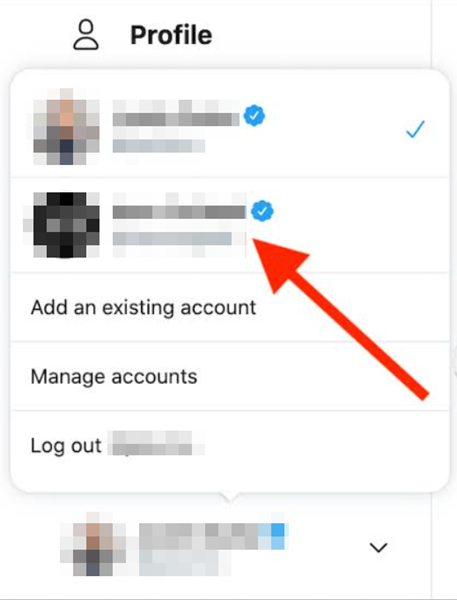
- iOS: Tap the navigation menu, then the "more" icon, then choose "Create new account" or "Add an existing account."
- Android: Tap the down arrow in the header, then pick "Create new account" or "Add existing account."
- Desktop: Click your profile icon in the side menu, choose the "more" or plus icon, then select "Add an existing account."
Once added, tap your profile icon to switch between accounts. Every account needs its own email address. A phone number may also be requested during signup.
📧 Email and Phone Tips
- Email aliases: With Gmail, an address like
[email protected]routes to one inbox. It works for low-stakes accounts. But it ties your accounts to one mailbox, so use separate mailboxes for important brand accounts. - Phone numbers: Reusing one number across accounts is limited. X also tends to reject VoIP and virtual numbers, so use a real SIM-based number.
- Security: Turn on two-factor authentication. Store unique passwords in a password manager.
⚠️ Challenges of the Official Method
App switching is convenient, but it has clear downsides:
- Messy notifications: Alerts from all accounts can blend together, so it's easy to miss messages or reply from the wrong account.
- Shared fingerprints: Accounts on the same phone share the same device and network signals. X may link them, and enforcement against one account can affect others.
- No merging: X does not let you merge accounts or move posts and followers between them.
When you manage a larger network, you need dedicated isolation tools. 🔧
🛡️ The Best Method for Agencies: Anti-Detect Browsers + Residential Proxies
Managing dozens of brand or client accounts? Then keeping each one separate matters. Isolation means a problem on one account is less likely to spill over to the rest.
Best for: Social media agencies, growth teams, and marketers who manage many independent, legitimate profiles.
Tools: Anti-detect browsers such as GoLogin, Incogniton, or AdsPower. They create separate browser profiles, each with its own fingerprint, cookies, and proxy IP.
Core advantage: Each profile looks like its own device on its own network. That reduces accidental linking through shared hardware signals or IP addresses.
💡 Important: These tools protect legitimate operations. They do not make rule-breaking safe. Spam, fake personas, and ban evasion can still get accounts suspended, whatever setup you use.
Why Traditional Methods Fall Short for Multiple Twitter Accounts
Standard tools struggle at scale:
- Datacenter VPNs and free proxies: Their IPs are shared by many users and often appear on blocklists. Logging in through them makes CAPTCHAs and verification prompts more likely.
- Incognito mode: It only clears cookies when you close the window. It doesn't change your canvas fingerprint or hardware and OS signals. Several incognito windows on one computer still look like one device.
🚀 Step-by-Step: Set Up Multiple Twitter Accounts Safely
Follow these four steps to build a secure environment:
Step 1: Get Your Proxy Credentials
Get clean proxy details from a trusted provider such as UtaProxy,. You'll need the IP or host, port, username, password, and protocol. Choose SOCKS5 or HTTP(S), whichever your anti-detect browser supports.
🔒 Protect Your Accounts with UtaProxy Twitter Proxies
Need stable, clean IPs for your Twitter workflow? UtaProxy Twitter Proxies give you access to 100M+ residential IPs across 200+ countries. They work smoothly with popular anti-detect browsers and automation tools. Give each account its own IP and keep your network organized.
Step 2: Install an Anti-Detect Browser
Download GoLogin, Incogniton, or AdsPower and install it on your computer.
Step 3: Create One Profile per Twitter Account
Open the browser and add a new profile for each account. Keep each fingerprint unique so profiles stay separate.
Step 4: Assign a Dedicated Proxy to Each Profile
Enter the proxy details in each profile's settings. Run the built-in connection test first. Confirm that the profile shows the proxy's IP, not your real one.
🎯 How to Choose the Right Proxy for Your Twitter Workflow
Different tasks call for different proxies. This table matches common workflows with suitable setups:
| Twitter Use Case | Best Proxy Type | Why It Fits | Recommended UtaProxy Solution |
|---|---|---|---|
| Long-Term Brand and Client Accounts | Static Residential / ISP Proxies | A fixed IP with a residential-style profile. Consistent logins avoid location-change alerts. | UtaProxy ISP Proxies (exclusive IPs, from $3/IP) |
| Setting Up New Brand or Client Accounts | Rotating Mobile Proxies | Many real users share mobile carrier IPs, so they are less likely to be flagged during signup. Each account still needs a genuine purpose. | UtaProxy Rotating Mobile Proxies (from $2/GB) |
| Public Data Monitoring and Trend Research | Rotating Residential Proxies | Rotates IPs per request and supports high concurrency. Use it within X's terms, and prefer the official API where it covers your needs. | UtaProxy Rotating Residential Proxies (from $0.65/GB) |
Next, let's look at tools that simplify daily posting and replies across accounts. 🗓️
🧰 Level Up: Social Media Management Tools
Anti-detect browsers keep accounts separate. Management tools make daily work faster.
Best for: Social media teams, creators, and businesses with many active profiles.
Popular tools: Agorapulse and OpenTweet connect several Twitter profiles to one dashboard. Hootsuite, Buffer, and Sprout Social offer scheduling, publishing, and analytics. X Pro (formerly TweetDeck) is another option, but it requires an X Premium subscription. Running ads? X Ads multi-user login lets your team access ad accounts without sharing passwords.
Core advantage: Schedule posts, monitor mentions, track performance, and answer DMs from one place. No constant logging in and out. ✅
To keep your accounts healthy long term, build these habits. 💪
✅ Best Practices for Managing Multiple Twitter Accounts
These habits help keep your risk low:
- Keep a 1:1 profile-to-proxy ratio. Give each important account its own static ISP proxy. Don't share one IP across several high-value accounts.
- Ramp up new accounts gradually. For the first 7 to 14 days, act like a real user. Post naturally, follow relevant accounts, and avoid mass links or automated DMs.
- Write unique content. Give each account its own voice and posts. Never publish duplicate content across accounts.
- Stagger your schedule. Spread posting times across your network. Avoid publishing at the same second.
- Don't cross-engage. Don't have your own accounts like, retweet, or reply to each other to boost reach.
- Keep identities distinct. Use different recovery emails, real phone numbers where possible, profile photos, and bios for each account.
- Stay authentic. Be transparent about who runs each account. Avoid fake personas.
- Secure every login. Use two-factor authentication, unique passwords, and a password manager.
🆘 What If One of Your Accounts Gets Suspended?
Don't panic, and don't create a new account to get around it. That counts as ban evasion. Instead, submit an appeal through X's Help Center. Explain clearly why you believe the suspension was a mistake. Then review your other accounts for duplicate content or shared signals.
Still have questions? Check the quick answers below. 👇
❓ Frequently Asked Questions (FAQ)
Is it against Twitter's rules to have multiple accounts?
No. Having more than one account is allowed. Problems start when you use them for spam, fake engagement, deception, or ban evasion.
Will Twitter ban me for using a proxy?
Using a proxy is not banned in itself. But free proxies and datacenter IPs are often flagged and can trigger extra checks. Quality residential or ISP proxies look like normal home connections. They won't protect you from rule violations, though.
Can I manage multiple Twitter accounts with a VPN?
A VPN is not ideal for multi-account work. It usually routes traffic through a shared IP used by many people. It also doesn't separate your browser fingerprints. Dedicated proxies plus separate browser profiles give better isolation.
How many Twitter accounts can I run per proxy IP?
The safest setup is 1 dedicated IP per account. For low-risk accounts, some users share an IP between 2 or 3 accounts at most. Avoid sharing IPs between important accounts.
Can you have multiple X accounts with the same email?
No. Each X account needs its own email address. Gmail aliases such as [email protected] can work for low-stakes accounts. But they link your accounts to one inbox. For brand or client accounts, use separate mailboxes.
Can I merge two Twitter accounts?
No. X doesn't offer a way to merge accounts or move posts, followers, or following between them.
🏁 Final Verdict
The safest way to manage multiple Twitter accounts starts with following X's rules. Give every account a real purpose, unique content, and honest engagement. Beyond that, pair anti-detect browsers with dedicated proxies. Browsers isolate device signals, and clean proxies give each profile its own IP.
Match your proxy to your workflow. Use UtaProxy Static ISP Proxies for long-term brand and client accounts. Use UtaProxy Rotating Residential Proxies for public data monitoring. You'll grow your reach while protecting your network. 🚀
Daniel Carter
Proxy & Web Data Specialist
Daniel Carter is a Proxy & Web Data Specialist at UtaProxy, focusing on proxy technology, web data collection, and online infrastructure. He writes practical guides and in-depth insights to help businesses understand proxy solutions, choose the right proxy type, and build more reliable data workflows.
You May Also Be Interested

What Are ISP Proxies? A Plain-English Guide to Static Residential Proxies (2026)
What are ISP proxies? Learn how static residential proxies work, how they compare to datacenter and residential IPs, real costs, and the best use cases.


What Are Residential Proxies? How They Work, Types & Use Cases (2026 Guide)
Learn what residential proxies are, how they route through real home IPs, all proxy types, top use cases, and how to pick a safe provider in 2026.