








Instagram IP Ban: What It Is, How to Fix It & How to Stop It Coming Back
You open Instagram to post, reply to DMs, or manage your multiple Instagram accounts. Then an error stops you: "The IP address you are using has been flagged as an open proxy." 😟 Sometimes the app just refuses to connect.
That usually means Instagram has restricted your IP address. In other words, you are facing an Instagram IP ban.
An Instagram IP ban is a network-level restriction. Meta's systems flag an IP address when they see risky signals. Think automated high-frequency requests, abusive accounts on the same connection, or traffic routed through low-quality VPNs and datacenter proxies. Once an IP is flagged, Instagram can limit or refuse connections from it.
⚡ Key Takeaways
- 🌐 What it means: An IP ban restricts access to Instagram from one IP address. It affects every account and device using that connection, not just one profile.
- 📱 How to confirm it: Turn off Wi-Fi and open Instagram on mobile data. If it loads, your Wi-Fi IP is the problem.
- 🔧 Quick fixes for personal users: Switch networks, restart your router, clear cookies and cache, or update the app.
- ⏳ How long it lasts: Meta does not publish ban lengths. Light restrictions often clear within 24–48 hours. Abused IPs can stay flagged much longer.
- 🛡️ Pro solution for marketers and agencies: Pair anti-detect browsers with clean, dedicated Instagram Proxies to keep accounts isolated and lower your risk of IP flags.
Before jumping into the fixes, let's look at how an IP ban works behind the scenes. 👇
What Is an Instagram IP Ban and How Does It Work?
Every device on the internet connects through an IP address. At home, all your devices usually share one public IP through your router. 🏠
When Instagram flags that IP, it can refuse or limit connections coming from it. This does not block the whole internet. It only affects your access to Instagram. But every device on that network feels it. You may be unable to load feeds, log in, post, or create new profiles from that connection.
🔍 How Instagram Detects and Flags IP Addresses
Meta monitors traffic with automated risk systems. Meta does not publish its exact rules. But these three signals are widely reported to matter:
- ⚡ Request frequency: Hundreds of automated likes, comments, or follows in a short time look like spam.
- 🏢 Connection type: Traffic from consumer ISPs (home or mobile) looks more natural than traffic from cloud datacenters. Datacenter IPs tend to face tougher anti-bot checks.
- 📉 IP reputation: If an IP has a history of spam or abuse, it carries more risk. This includes history from before you ever used it.
In practice, bans often come from a mix of IP reputation, device signals, and account behavior.
⚠️ Common Error Messages Linked to an Instagram IP Ban
When your IP is flagged, you may see one of these messages:
- "The IP address you are using has been flagged as an open proxy. If you believe this to be incorrect, please visit help.instagram.com."
- "An error has occurred. Please try again later."
- "Network request failed."
Note: the last two messages are generic. They can also appear during outages or weak connections. Always run the tests below before assuming it is an IP ban.
🆚 IP Ban vs. Action Block vs. Shadowban vs. Device Ban
These restrictions look similar but work very differently:
| Restriction Type | Target Scope | Impact on You |
|---|---|---|
| IP Ban | The IP address of your network connection | Instagram may fail to load or log in for every account and device on that network. |
| Action Block | A specific account | Certain actions (like, follow, comment, DM) are paused. The rest of the app still works. |
| Shadowban (reduced reach) | Content visibility | Your account works normally, but posts and Reels may reach fewer non-followers. Meta does not use the term "shadowban" officially. |
| Device Ban | A specific phone or computer | Instagram acts up on that one device, even on a new network. |
Quick rule: if a new network fixes it for all devices, it is the IP. If only one device is affected, think device or account.
🚀 Keep Your Connections Clean with Instagram Proxies
Managing accounts for your brand or clients? Don't let a dirty IP interrupt your workflow. Route each profile through high-trust Instagram Proxies and give every account a stable, clean network identity. ✅
Why Instagram Says "Flagged as an Open Proxy"
This is the most searched IP ban error. 🔎 It often appears even when you never used a proxy.
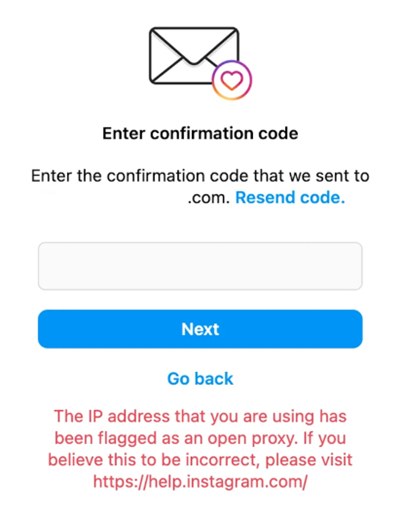
Common reasons include:
- ♻️ A recycled or abused IP: Your ISP may have given you an address that someone else used for spam.
- 🔓 A low-quality VPN or proxy: Free or shared servers are used by thousands of people. One spammer can burn the whole IP.
- 🦠 A compromised device or router: Malware can turn a device into a hidden proxy or part of a botnet.
- 👥 Abusive accounts on the same IP: Many policy-violating accounts on one address can taint it.
- 🏢 Shared networks: Offices, campuses, and public Wi-Fi share one IP across many users.
Now let's see how you can verify that the IP is really the problem. 👇
How to Tell If Your IP Address Is Banned
Not every loading glitch is an IP ban. Run these quick checks:
- 📱 The mobile data test: Turn off Wi-Fi and use 4G/5G. If Instagram loads right away, your Wi-Fi IP is likely restricted.
- 💻 The device test: Try another phone or computer on the same Wi-Fi. If it fails there too, the network is the cause.
- 🌐 The browser test: Open a private window or a different browser. This rules out corrupted cookies.
- 🔑 Valid login, instant error: You enter the right credentials, but the app shows a network error or the open proxy message.
- 👥 Several accounts fail at once: Every account on that network hits errors at the same time.
- 🆕 New sign-ups fail fast: Creating a new account from that connection fails or gets flagged right away.
Tip: also check Instagram's service status and your own internet speed. An outage can look like a ban. ✔️
Next, let's explore why these bans happen in the first place. 👇
Top Causes of an Instagram IP Ban
Knowing the triggers helps you avoid them next time:
- 🤖 Bot automation and high-frequency actions: Auto-likers, mass-follow scripts, and scrapers can exceed Instagram's limits and put your IP at risk.
- 👥 Too many accounts on one IP: Instagram does not publish a safe number. But logging into many unrelated profiles from one connection can raise link and spam flags.
- 🔌 Cheap or free VPNs and datacenter proxies: These IPs are shared by many users. If one of them spams, the whole IP can be flagged.
- 🚫 Policy violations on linked accounts: Severe violations can hurt the reputation of the IP and the devices tied to those accounts.
- 🦠 Malware or a hacked router: Your network may send abusive traffic without your knowledge.
- ♻️ Bad luck with a recycled IP: Sometimes the previous owner of your IP caused the problem.
So is a network ban permanent, or does it clear on its own? Let's find out. 👇
Is an Instagram IP Ban Permanent or Temporary?
Meta does not publish official ban durations. In most reported cases, IP restrictions are temporary. ⏳ Light rate-limit flags often clear within about 24 to 48 hours, once the suspicious activity stops.
However, some IPs stay flagged for much longer. This is more likely when an IP is tied to heavy abuse, such as a spam farm, a malicious bot server, or a compromised proxy node.
📊 Factors That Affect Ban Duration
- 🔥 Severity: Minor rate-limit spikes tend to clear faster than sustained spam or scraping.
- 🔁 Repeat offenses: Repeated flags from the same network may lead to longer restrictions.
- 🏢 IP type and reputation: Datacenter IPs are generally treated with more suspicion than residential or mobile IPs.
✅ How to Tell If an IP Ban Has Lifted
Reconnect to your home Wi-Fi after a day or two. Open a private browser window and load Instagram. If the login page opens with no error, the restriction is likely gone. 🎉
Need access right now? Use the practical fixes below. 👇
How to Fix an Instagram IP Ban (Step-by-Step)
Work through these steps in order. Start with the easiest. 🪜
Solution 1: Switch Networks (Fastest Test) 📶
Disconnect from the flagged Wi-Fi. Use mobile 4G/5G data, a phone hotspot, or another Wi-Fi network. You get a different IP address instantly. This also confirms whether your home IP is the culprit.
Solution 2: Restart Your Router to Get a New IP 🔄
Many home ISPs assign dynamic IP addresses. Unplug your router for 5 to 10 minutes, then plug it back in. Your ISP may assign a new public IP. Note that some ISPs give you the same IP back, especially after a short restart. If so, try leaving it off longer or move on to the next step.
Solution 3: Clear Cookies, Cache, and Update the App 🧹
Corrupted session data can cause login errors that look like a ban. Press Ctrl + Shift + Delete in your browser to clear cookies and cached files. On mobile, update Instagram or clear its cache, then log in again. You can also try another browser or device.
Solution 4: Wait It Out ⏳
If you do not need access urgently, waiting is the safest option. Stop all automated activity and avoid repeated login attempts. Many light flags clear in 24 to 48 hours.
Solution 5: Contact Your Internet Service Provider (ISP) 📞
If your ISP gave you a static IP, a router restart will not change it. Ask your provider to assign a new public IP. Explain that your current address appears to be blocked by some websites. Also scan your devices for malware, since a compromised device can get an IP flagged.
Solution 6: Use a Clean Residential or Mobile Proxy 🛡️
Skip free or cheap public VPNs. Their shared IPs are the most common cause of the open proxy error. Instead, use a reputable provider that offers clean residential or mobile IPs. This works best for people who manage accounts for work. Use proxies only for accounts you own or have permission to manage, and follow Instagram's terms.
🔒 Tired of IP Flags Slowing You Down?
Upgrade your connection setup today. Register for UtaProxy to access a pool of over 100 million residential IPs across 200+ locations worldwide. 🌍 Assign a clean IP to every profile and work with confidence.
Solution 7: Submit a Report to Instagram 📝
If you think your IP was flagged by mistake, open the Instagram app on mobile data. Go to Settings > Help > Report a Problem. Describe the error and include the exact message. The open proxy message also points you to Instagram's Help Center. Note that responses are not guaranteed, so use this alongside the fixes above.
⚡ Which Fix Should You Try First?
| Fix | Speed | Best For |
|---|---|---|
| Switch to mobile data or hotspot | Instant | Confirming and bypassing a flagged home IP |
| Restart your router | 5–10 minutes | Home users with a dynamic IP |
| Clear cache and update the app | Under 5 minutes | Login errors that may be session related |
| Contact your ISP | Hours to days | Static IPs and recycled bad IPs |
| Clean residential or mobile proxy | Minutes | Marketers, agencies, and multi-account work |
| Wait it out | 24–48 hours (often) | Light, temporary flags |
What NOT to Do While Your IP Is Banned
Some quick reactions make things worse. Avoid these: 🚫
- 🔁 Don't hammer the login button. Repeated attempts can add more flags.
- 🆕 Don't create new accounts to "test" the ban. New sign-ups from a flagged IP often fail and can add risk.
- 🆓 Don't use a free VPN. Shared datacenter IPs are often already flagged and can trigger security checks on your account.
- 🤖 Don't keep running bots or automation tools. That is often how the ban started.
- 📲 Don't log in and out across many accounts. Rapid switching looks suspicious.
Fixing a one-time ban is easy. Preventing the next one takes a better setup. 👇
How to Prevent Future Instagram IP Bans (Pro Strategy for Growth Teams & Agencies)
Agencies and social media managers cannot afford downtime. 💼 A secure multi-account setup needs several layers:
1. Use Anti-Detect Browsers for Profile Isolation 🧩
Pair your proxies with anti-detect browsers such as AdsPower, GoLogin, or Multilogin. They create separate browser profiles with their own fingerprint settings, such as Canvas, WebRTC, and User-Agent. This helps prevent device-based links between accounts.
2. Pair Every Profile with a Clean, Dedicated Proxy 🔐
Give each browser profile its own dedicated IP. This keeps your accounts from sharing one network identity. Here are two good options:
- 📶 UtaProxy Mobile Proxies (4G/5G): Mobile proxies use IPs from real cellular carrier networks. Carriers share these IPs across many real users through CGNAT. That makes platforms cautious about blocking them outright, so they tend to be more resilient than datacenter IPs. No proxy can guarantee zero flags, so good account behavior still matters.
- 🏠 UtaProxy Static Residential Proxies: These are dedicated IPs registered to real consumer ISPs. The IP stays the same over time. This stability suits long-term brand pages and Meta Business Suite ad accounts, where frequent location changes can raise flags.
Which Proxy Type Fits Your Use Case? 🧭
| Proxy Type | Trust Level on Instagram | Best For |
|---|---|---|
| Free VPN / shared datacenter | Low | Not recommended for social accounts |
| Static residential | High | Long-term brand pages and ad accounts |
| Mobile (4G/5G) | High | Multi-account management and mobile-first workflows |
3. Follow Operational Best Practices ✅
- 🌱 Warm up new profiles gradually: Don't post or DM heavily on day one. Spend 7 to 14 days on natural activity first.
- ⏱️ Stagger your actions: Don't run outreach on many accounts in the same minute. Space actions out by 15 to 30 minutes.
- 🚫 Skip unofficial automation: Avoid unverified scrapers and auto-follow tools that break Instagram's rules.
- 📍 Keep location consistent: Match the proxy location to the account's usual region. Avoid sudden jumps between countries.
- 🔒 Secure your network: Use a strong router password, update firmware, and scan devices for malware.
Review the quick answers below for common questions about Instagram IP bans. 👇
Frequently Asked Questions (FAQ)
Q1: How long does an Instagram IP ban last?
Meta does not publish official durations. Many light, temporary restrictions clear within about 24 to 48 hours. If an IP is tied to heavy abuse, such as bot farms or spam, it can stay flagged for much longer.
Q2: Does an IP ban mean my Instagram account is deleted?
No. An IP ban restricts access from a specific connection. Your account, posts, and followers are not removed by the IP restriction itself. Switching to a clean network usually restores access.
Q3: Why does Instagram say my IP is flagged as an open proxy when I'm not using one?
Your ISP may have assigned you an IP with a bad history. You may also share an IP with abusive users, or a device on your network may be compromised. Switching networks and scanning for malware are good first steps.
Q4: Can I use a free VPN to get around an Instagram IP ban?
It is strongly discouraged. Free VPNs use shared IPs that are often already flagged. They can fail to fix the ban and may trigger extra security checks on your account.
Q5: Is an IP ban the same as an account ban?
No. An IP ban targets your network connection. An account ban or disable targets a specific profile. If you can log in from mobile data, the issue is likely your IP, not your account.
Q6: Do mobile proxies prevent Instagram IP bans?
They can lower your risk, since mobile IPs come from real carrier networks and are shared by many real users. But no proxy can guarantee you will never be flagged. Account behavior, device fingerprints, and automation habits still matter.
Q7: How many Instagram accounts can I use on one IP?
Instagram does not publish a number. For agencies and teams, the safest approach is one dedicated IP and one isolated browser profile per account.
Build a Bulletproof Setup to Avoid Instagram IP Bans
An Instagram IP ban can disrupt your work, but it is manageable. 💪 Personal users can often fix a temporary block by switching to mobile data, restarting the router, clearing cookies, or waiting a day or two.
For growth agencies, marketers, and e-commerce sellers managing many accounts, long-term stability needs better tools. Combine anti-detect browsers with UtaProxy Instagram Proxies to give every account a clean, isolated network identity. Then follow safe activity habits, and you can scale with far fewer interruptions. 🚀
Daniel Carter
Proxy & Web Data Specialist
Daniel Carter is a Proxy & Web Data Specialist at UtaProxy, focusing on proxy technology, web data collection, and online infrastructure. He writes practical guides and in-depth insights to help businesses understand proxy solutions, choose the right proxy type, and build more reliable data workflows.
You May Also Be Interested
Can You Have Multiple Instagram Accounts? How to Manage Them Without Bans
Can you have multiple Instagram accounts? Yes, up to 5 per device. Learn setup, switching, and how to scale beyond 5 without linked-account bans. 🚀

Instagram "Feedback Required" Error: How to Fix It and Prevent It
Locked out by Instagram's Feedback Required error? See why it happens, 9 quick fixes, and how the right proxy setup stops it for good.
Automatic Instagram Likes: How They Work, the Real Risks, and How to Stay Compliant
Automatic Instagram likes can get you banned fast. See how detection works, what's actually safe, and how to automate the compliant way in 2026.