








How to Fix Instagram “Action Blocked” (and Stop It Coming Back)
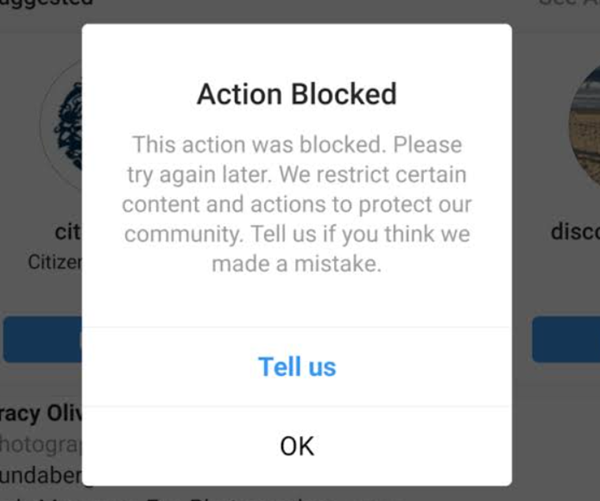
You tap Like. Or Follow. Or Send. Then this pops up: "Action Blocked / Try Again Later." 😤
Don't panic. Your account is not deleted. Instagram has simply paused one or more actions because its automated systems saw activity that looked spammy, too fast, or suspicious.
An Instagram action block is a temporary restriction on actions such as liking, commenting, following, unfollowing, or sending DMs. To fix it, stop the restricted actions, remove unauthorized apps, change your connection, report the problem, and wait for the block to lift. If you run several accounts, you also need clean, separated network environments.
⚡ Key Takeaways
- Main causes: too many actions too fast, third-party growth tools, sudden IP or location changes, and shared networks across several accounts.
- Quick fix: pause all restricted actions, disconnect unapproved apps, switch between Wi-Fi and mobile data, and tap "Tell Us" or use Report a Problem.
- Long-term fix: warm up new accounts slowly, space out your actions, and separate multi-account setups with anti-detect browsers and dedicated Instagram proxies.
First, let's confirm what kind of restriction you are dealing with. 🔍
What Is an Instagram Action Block? 🤔
An action block is a feature restriction. Instagram applies it when your behavior looks automated or abusive, even if you are a real person tapping manually.
The message usually reads like this: "We restrict certain activity to protect our community. Tell us if you think we made a mistake." You may also see "Try Again Later" or "We limit how often you can do certain things."
How to Tell You Are Action Blocked 👀
- A pop-up appears. Tapping Like, Follow, or Comment shows "Action Blocked" or "Try Again Later."
- Only some actions fail. You can still scroll your feed and watch Stories. But specific interactions are blocked.
- Engagement drops. You can't interact with other profiles, so your activity and reach can dip.
Action Block vs. Shadowban vs. IP Ban
These three get mixed up all the time. Here is the difference:
- Action block: specific actions (like, follow, comment, DM) fail. Browsing still works.
- Shadowban: informal term for reduced reach. You can act normally, but your posts may appear less in hashtags or Explore. Instagram doesn't use this term officially.
- IP ban: your network address is restricted, so problems follow your Wi-Fi or router. Suspect this? Read our guide on how to fix an Instagram IP ban.
Types of Instagram Action Blocks and How Long They Last ⏳
Instagram does not publish official block durations. The timeframes below come from community reports and third-party testing, so treat them as typical ranges, not guarantees.
| Block Type | Typical Duration | Common Trigger | What to Do |
|---|---|---|---|
| Temporary action block | A few hours up to 24–48 hours (sometimes up to 72) | A short burst of likes, follows, comments, or DMs | Stop all restricted actions and let it expire |
| Block with an expiration date | The date and time shown in the pop-up | Repeated rate-limit hits | Wait until the stated time passes |
| Block without an expiration date | Several days to a few weeks | Third-party apps, aggressive or repetitive activity | Remove apps, report the problem in Settings, pause activity |
| Account suspension or disablement | Until reviewed, or permanent | Serious or repeated policy violations | Follow Instagram's official appeal process |
Next, let's look at what usually causes these blocks. 👇
What Causes an Instagram Action Block? 🎯
Check these five common triggers. They help you spot what went wrong and avoid repeat blocks.
1. Too Many Actions Too Fast ⚡
Instagram limits how many actions an account can take in a short time. Meta does not publish exact numbers. Limits also change with your account age, history, and trust level.
Fast, repetitive tapping is the classic trigger. It can happen even when you do everything by hand.
Here are conservative, community-tested guidelines. Real limits vary, so stay below them:
| Action | New Account (first weeks) | Established Account |
|---|---|---|
| Follows per day | About 50–100 | About 150–200 |
| Likes per day | About 250–300 | About 300–500 |
| Comments per day | About 30–50 | About 100–150 |
| DMs to non-followers per day | About 10–20 | About 30–50 |
2. A New or Low-Trust Account 🌱
Fresh accounts have less history. So they are usually more sensitive to sudden activity. Following hundreds of people or posting mass comments on day one is a fast way to get flagged.
3. Third-Party Automation Tools 🤖
Growth bots, auto-likers, auto-follow tools, and engagement-buying services break Instagram's rules on inauthentic activity. For example, using automatic Instagram likes software can give Meta's systems clear automation signals and lead to restrictions or worse.
4. Sudden IP and Location Changes 🌍
Switching VPN servers, hopping across public Wi-Fi, or logging in from far-apart places within minutes looks odd. Instagram may read it as a possible account takeover and add a security restriction.
5. Spam Reports and Guideline Violations 📢
Copy-pasted comments, repeated promotional DMs, and copyrighted or prohibited content get reported. Many reports can lead to restrictions on your account.
Now for the part you came for. Here is how to remove an active block. 🛠️
How to Fix "Action Blocked" on Instagram: 9 Steps ✅
Work through these steps in order. Most blocks clear with the first few.
Step 1: Pause the Blocked Actions ⏸️
Stop liking, commenting, following, unfollowing, and sending DMs. Give it at least 24 hours.
Don't keep tapping the button to "test" it. Repeated attempts can extend the restriction.
Step 2: Disconnect Third-Party Apps 🔌
Remove any growth tools, auto-likers, or follower trackers. In the app, go to Settings and activity > Website permissions > Apps and websites. Revoke everything you don't fully trust. Menu names can vary slightly by app version.
Step 3: Change Your Password 🔐
Pick a new, strong password. Then log out of other devices. This helps cut off any tool or session still acting on your account.
Step 4: Switch Your Connection 📶
Turn off Wi-Fi and try on 4G/5G, or the other way around. If the block disappears on a different network, your original IP may be the problem. It may not be your account.
Step 5: Turn Off VPNs and Use Your Main Device 📱
Public VPNs share IPs with many users and can look suspicious. Disable yours. Then use the phone you normally log in from. Consistent devices and locations help your account look stable.
Step 6: Update the App and Clear the Cache 🧹
Update Instagram to the latest version. Clear the app cache if your device allows it. This won't fix an account-level block. But it can clear glitches that look like one.
Step 7: Report the Problem 📝
If the pop-up shows a "Tell Us" button, tap it. You can also go to Settings and activity > Help > Report a problem. Keep your message short and factual. Say which action is blocked, when it started, and that you didn't use automation.
Step 8: Wait for the Block to Expire ⌛
Some pop-ups show an exact expiry time. Wait until it passes. Then return slowly. Start with a few manual actions, not a burst.
Step 9: Review What Triggered It 🔎
Blocks tend to build on each other. If you get blocked again and again, slow down more, remove all automation, and check your network setup. If your account is disabled or suspended, use Instagram's official appeal flow instead.
💡 Quick tip: Switching to mobile data is the easiest fix to try first. It only helps when your Wi-Fi IP was the issue. If it doesn't work, the restriction is tied to your account. Wait it out.
Waiting works for one personal account. But it is a poor plan for teams running many profiles. That needs a proper setup. 👇
How to Manage Multiple Instagram Accounts Without Action Blocks 🧩
Agencies, social media managers, and e-commerce teams often run 5 to 100+ accounts. Putting them all on one phone or one office Wi-Fi is risky. One flagged IP or device can affect several accounts at once.
Instagram lets you add up to five accounts to one app login. Beyond that, you need clean separation. For a full walkthrough, read our guide on how to manage multiple Instagram accounts safely.
The safest setup has two layers:
Layer 1: Separate Browser Profiles 🖥️
Anti-detect browsers such as AdsPower, GoLogin, Multilogin, or Dolphin{anty} create isolated browser profiles. Each profile has its own cookies, user agent, and browser fingerprint settings. That keeps your accounts from sharing one device footprint.
Layer 2: A Dedicated Proxy for Each Profile 🌐
Give every profile its own stable IP. This keeps the network side of each account separate too.
- Mobile Proxies (4G/5G) 📱: Traffic goes through real mobile carrier networks. Carrier IPs are shared by many real users, so platforms tend to treat them more gently than datacenter IPs. A strong pick for Instagram growth and daily account work.
- Static Residential Proxies 🏠: Dedicated residential IPs from consumer ISPs. The address stays fixed. That makes them a good fit for long-term brand pages and Meta Business Suite ad accounts that need a stable login location.
One honest note. Proxies and anti-detect browsers fix technical overlap between accounts. They don't make spam or automation allowed. You still need to follow Instagram's rules. ✅
🚀 Stop Chain Blocks Across Your Accounts
Give each account its own clean, dedicated IP. Explore Instagram Proxies and pick the mobile or static residential plan that fits your workflow.
Good habits matter just as much as good infrastructure. Here is what to do every day. 👇
Best Practices to Prevent Action Blocks 🛡️
- Warm up new accounts slowly 🌱. Spend the first 1–2 weeks on light, natural activity. Start with a small number of actions per day. Then increase gradually.
- Space out your actions ⏱️. Don't tap through a long list in minutes. Mix likes, follows, comments, and posting so it looks natural.
- Vary your content ✍️. Never paste the same comment or DM again and again. Repetition is a classic spam signal.
- Keep your location consistent 📍. Match your proxy location with your browser's timezone and language. Avoid sudden jumps.
- Complete your profile ✅. Add a photo, bio, and real posts. Linking your account in Meta Accounts Center is optional. It won't guarantee protection, but it can't hurt.
- Use reliable IPs 🔒. Skip public VPNs and cheap shared datacenter IPs. Choose 4G/5G mobile proxies or static residential proxies for multi-account work.
Still have questions? Here are quick answers. 💬
Instagram Action Blocked FAQ ❓
Q1: How long does an Instagram action block last?
Most first-time blocks last from a few hours to about 24–48 hours. Repeat or serious blocks can last several days or longer. Instagram doesn't publish exact durations, so these are typical community-reported ranges.
Q2: Will an action block delete my account?
No. An action block limits certain features. Your profile, posts, and followers stay in place. But repeated violations can lead to stronger penalties, including account suspension.
Q3: Why am I action blocked when I did nothing wrong?
Fast manual activity can look like a bot. A flagged VPN or a shared Wi-Fi network can also trigger it. Sometimes the system simply makes a mistake. That is why the "Tell Us" and Report a Problem options exist.
Q4: Can I use a VPN to bypass an action block?
It's not recommended. Sudden IP changes can look suspicious and may make things worse. Switch networks normally, such as Wi-Fi to mobile data, and wait for the block to expire.
Q5: Will reinstalling Instagram remove the block?
Usually not. Action blocks are generally tied to your account, not the app. Updating or reinstalling may fix glitches, but it won't lift a real restriction.
Q6: Which proxy is best for multi-account Instagram use?
Mobile 4G/5G proxies are a popular choice for daily activity because carrier IPs blend in with normal mobile traffic. Static residential proxies suit accounts that need one fixed IP long term.
Final Verdict 🏁
An Instagram action block is annoying, but it's fixable. For a single account, the formula is simple. Pause, remove unauthorized apps, switch your connection, report the problem, and wait it out. Then rebuild activity slowly.
For agencies and growth teams, prevention matters more than repair. Separate every account with its own browser profile and its own dedicated IP. Keep actions human-paced and varied.
✨ Ready to Scale Without the Blocks?
Set up your Instagram accounts on dedicated, high-quality IPs. Check out UtaProxy Instagram Proxies and keep your accounts running smoothly.
Daniel Carter
Proxy & Web Data Specialist
Daniel Carter is a Proxy & Web Data Specialist at UtaProxy, focusing on proxy technology, web data collection, and online infrastructure. He writes practical guides and in-depth insights to help businesses understand proxy solutions, choose the right proxy type, and build more reliable data workflows.
You May Also Be Interested
Instagram IP Ban: What It Is, How to Fix It & How to Stop It Coming Back
Seeing "flagged as an open proxy" on Instagram? Learn how to confirm an Instagram IP ban, fix it in minutes, and stop it from coming back.

Can You Have Multiple Instagram Accounts? How to Manage Them Without Bans
Can you have multiple Instagram accounts? Yes, up to 5 per device. Learn setup, switching, and how to scale beyond 5 without linked-account bans. 🚀
Automatic Instagram Likes: How They Work, the Real Risks, and How to Stay Compliant
Automatic Instagram likes can get you banned fast. See how detection works, what's actually safe, and how to automate the compliant way in 2026.